Conversational AI Platforms: A Complete Guide to Choosing One for Your Business
 Grzegorz Graczyk13 min read
The right conversational AI platform reduces the work between a visitor’s question and a useful outcome: a resolved issue, a qualified lead, or a clearer next step. The wrong one gives you another dashboard to monitor and another subscription to justify.
That difference rarely appears in a polished demo. It appears six weeks later, when a pricing answer is outdated, a promising conversation never reaches sales, and nobody knows who owns the bot.
Why demos are the wrong way to choose a conversational AI platform
A scripted question followed by a fluent answer tells you little about day-to-day performance. Your evaluation needs to cover five jobs: customer support, lead capture, knowledge-base grounding, integrations, and ongoing maintenance.
Modern conversational AI uses natural-language processing and, increasingly, large language models to interpret context and handle multi-turn conversations. As Dialpad’s buyer guide explains, this differs from a basic rule-based chatbot that follows fixed scripts and matches inputs to preset responses. Some platforms combine both approaches, keeping predictable flows for sensitive actions while using generative responses for questions.
The category is expanding quickly. WotNot cites Fortune Business Insights projecting market growth from $17.97 billion in 2026 to $82.46 billion in 2034. That forecast helps explain the crowded vendor lists; it doesn’t tell you which product fits your team.
Start with the work you need done and the systems you already use. Then test the complete workflow, including everything that happens after the AI answers.
The five types of conversational AI platforms

Before shortlisting vendors, answer three questions: Are you serving customers or internal teams? Is the primary channel text or voice? Do you want to build a custom system or buy a ready-to-run product?
Enterprise and developer platforms
Google Dialogflow CX, IBM watsonx, Microsoft Copilot Studio, and Rasa belong on the shortlist for teams building custom conversational experiences. They offer substantial control over workflows and connections to business systems, although their deployment models differ.
The typical buyer has engineering support and requirements that packaged tools struggle to meet. Budget for development, testing, and administration alongside licensing or consumption charges.
Helpdesk-native AI agents
Intercom Fin and Zendesk AI are natural candidates when your support team already works in those ecosystems. Their attraction is proximity to the existing inbox, support content, and agent workflow.
Outside that environment, evaluate the extra implementation and subscription requirements carefully. An AI agent’s value depends partly on how well it fits the system your agents actually use.
Voice and contact-center specialists
Retell AI, Cognigy, and Nextiva XBert address use cases where speech recognition, latency, and telephony matter. A phone conversation introduces problems that a website chat trial won’t expose: interruptions, background noise, and delays between turns.
If voice isn’t an immediate requirement, starting with text lets you validate the knowledge and escalation logic before adding those complications. If calls are your main channel, test voice from the beginning.
Standalone website chatbot builders
A standalone website chatbot builder makes sense when you need a focused conversational layer around an existing stack.
Connected marketing platforms
A connected marketing platform brings chat together with the systems that capture and act on website demand.
We take that second approach with ProjectHQ: conversations sit within a broader website workflow. The choice resembles the trade-off in our guide to all-in-one versus specialist SEO tools for small teams: depth in one function versus fewer operational gaps across several.
Platform type | Best for | Typical buyer | Watch out for |
|---|---|---|---|
Enterprise/developer | Custom workflows and backend actions | IT or engineering-led teams | Build time and consumption costs |
Helpdesk-native | Support inside an established helpdesk | Support leaders | Ecosystem dependence and outcome fees |
Voice/contact center | Phone-based service and routing | Contact-center operators | Speech quality, latency, and minute-based costs |
Standalone website builder | A focused website assistant | Marketing or operations teams | CRM sync and separate administration |
Connected marketing platform | Website conversations linked to growth workflows | Founders and small marketing teams | Whether specialist requirements exceed its scope |
Customer support: resolution, handoff, and the inbox
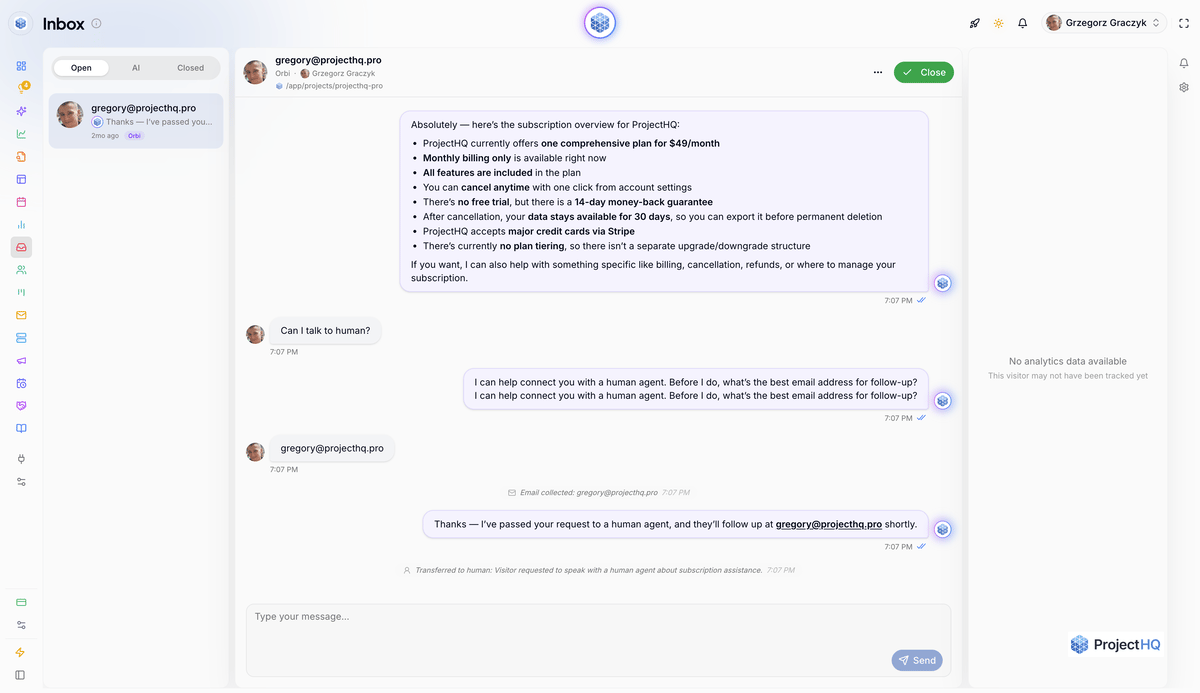
What happens when the answer isn’t enough?
Training on documentation is a starting point. The harder questions concern resolution: does the assistant answer the follow-up, recognize missing information, and escalate when human judgment is required?
Test a question with no documented answer. Then test a frustrated customer who asks for a person. Inspect what the agent receives: the complete transcript, visitor history where available, and enough context to avoid repeating the same questions. Also check the after-hours experience. A handoff button is of limited use if nobody explains when the customer will hear back.
Our AI chat assistant answers visitor questions from your knowledge base and handles follow-ups. Every conversation lands in a unified inbox where your team can step in. For SLA-driven ticketing or extensive messaging-channel coverage, prioritize a dedicated helpdesk.
Support volume changes the price
Compare the billable unit before comparing subscription prices. Vendors charge by resolution, conversation, minute, or tier, sometimes alongside agent seats.
WotNot’s comparison lists Intercom Fin at $0.99 per outcome. At that quoted rate, 3,000 billable outcomes would cost $2,970 before applicable seat charges. Treat that as an illustration and confirm current pricing and the definition of an outcome during your trial.
Ask each vendor to model your normal month and a high-volume month. Include reopened issues and conversations that require both AI and human assistance. Track customer-confirmed resolution separately from the vendor’s billing metric.
Lead capture: does the conversation become a contact?
Follow the lead beyond the chat window
Conversational AI can answer product questions, gather qualification details, and route interested visitors toward sales. The failure often happens afterward: the lead stays in the chatbot dashboard or reaches the CRM as an email address without the conversation that made it valuable.
During the trial, act like a prospect. Visit a product page, ask a buying question, provide contact details, and inspect the resulting record. Can sales understand the interest and next step without opening three tools?
Check which page views and activity accompany the contact, how anonymous activity is handled, and whether duplicate records appear when the visitor returns. An anonymous profile and an identified, follow-up-ready lead are different things; your reporting should distinguish them.
A pipeline your team can actually use
In our CRM, visitors who interact with your site become contacts with profiles that include page views and activity. Tags and filters help organize them. Our Lead Board gives the team a visual kanban pipeline to move contacts from first touch to closed deal without an export.
For a deeper evaluation of qualification and follow-up, use our guide to choosing an AI chatbot for lead generation. Pay particular attention to what sales receives, rather than counting every chat as a lead.
Knowledge-base grounding: where accuracy is actually decided
Retrieval helps, but source quality still matters
Retrieval-augmented generation, or RAG, retrieves relevant information from a knowledge base before generating an answer. Quickchat’s guide describes this grounding approach. It improves relevance and reduces unsupported answers, but it doesn’t guarantee accuracy.
A rule-based bot needs updates when its rules or answers change. A generative assistant also becomes unreliable when its source material goes stale. An old cancellation policy remains an old cancellation policy, however fluently the AI explains it.
Evaluate the source lifecycle
Ask what the platform ingests: website pages, uploaded documents, and external URLs are common priorities. Then establish how quickly a new source becomes usable, whether website changes trigger re-syncing, and how you inspect or remove sources.
Test conflicting content. If an archived page contradicts the current policy, you need a practical way to exclude it or establish which source governs the answer. Ask whether you can inspect the sources behind a response, too; that makes diagnosis much faster.
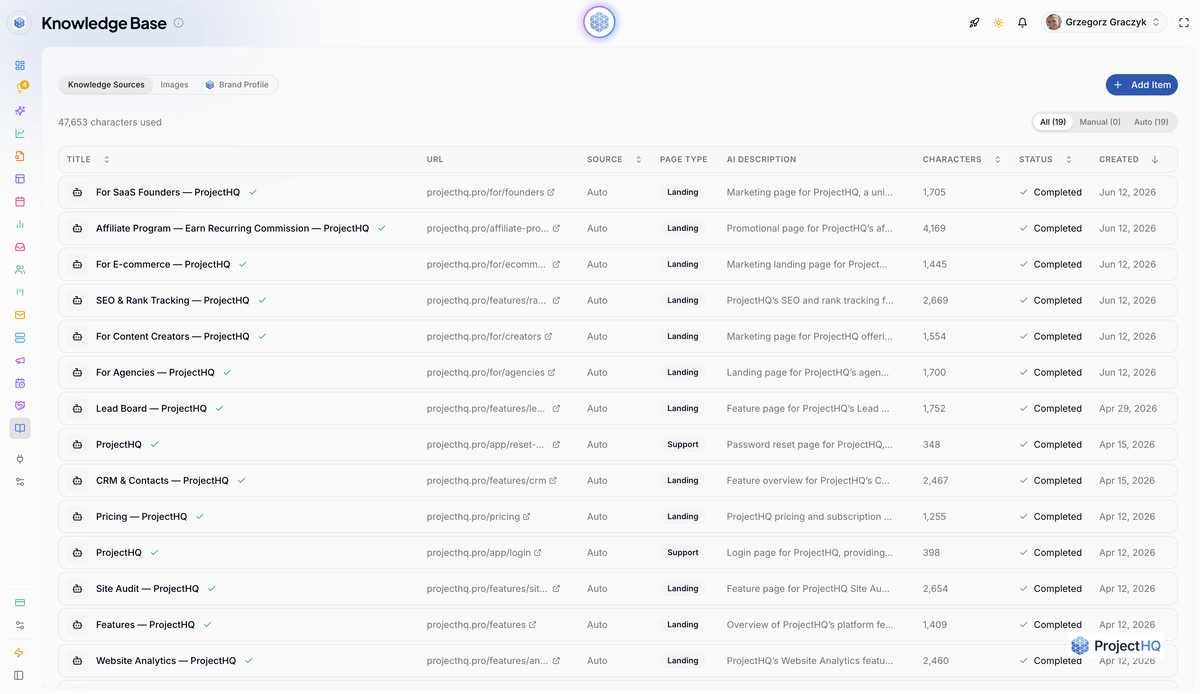
Our knowledge base brings together auto-crawled pages, documents, and brand information. Add a URL and it’s processed automatically, with new sources ready in seconds. Site Audit feeds classified pages into it, and the same knowledge base powers our AI features, including content creation.
Use the website assistant setup checklist to prepare the initial material. After launch, visitor questions help identify knowledge-base gaps, especially questions your internal documentation never anticipated.
Integrations: native connections versus middleware you maintain
Test the connection, not the logo
A CRM logo on an integrations page doesn’t establish what moves between the systems. Ask which fields sync, in which direction, and what happens when an operation fails. Native connections often reduce setup and maintenance compared with middleware, but reliability still needs testing.
For AI that takes actions, inspect backend permissions. Looking up an order and changing an order require different safeguards. Ask about authentication, action logs, and approval steps before allowing an assistant to alter customer data.
An open API matters for future flexibility. So do data exports: check whether you can retrieve contacts, transcripts, and knowledge sources in usable formats if you leave.
The chat, analytics, and content loop
Another connection deserves attention: how visitor questions inform marketing. Repeated questions reveal missing explanations, buying objections, and content opportunities. Those insights should reach the people responsible for your website.
With ProjectHQ, one website snippet starts analytics and live chat without wiring those functions together through separate vendors. Our guide to connecting AI content, chat, and SEO in one workflow explains the operational approach.
That still requires editorial judgment. A recurring question is a candidate for a better product page, FAQ, or article; it isn’t automatically a new blog post. See how to use chat transcripts to improve SEO content for the review process.
Privacy and governance: who can use conversation data?
A support transcript can contain account details or sensitive information a visitor volunteers. Map where that data travels before enabling the assistant: the chat vendor, its model providers, and any connected systems. These are questions to ask every shortlisted vendor; they aren't claims about our own controls.
Model providers, subprocessors, and residency
Ask whether prompts, retrieved source material, or transcripts are used to train models by the vendor or its model providers. Does the answer cover your plan by default, or require an opt-out? Request the contractual terms and the subprocessor list, including how you'll be notified of changes. Establish where data is stored and processed, whether inference happens outside the selected hosting region, and which residency commitments apply to backups.
Retention, deletion, and transcript access
Get a retention schedule for transcripts and model-provider logs. Ask whether you can set a shorter period and delete an individual visitor's conversation. What does deletion cover, how long does it take, and what remains in backups or downstream CRM records? Use synthetic data during the trial to check the deletion workflow without exposing a real customer's information.
Request a role-based access demonstration. Can you restrict transcript viewing, exporting, and deletion separately from knowledge-base editing? Check whether administrators can review access and export logs, and whether revoking a teammate's access also removes access through connected systems.
Sensitive data needs a handling rule
Decide which information the assistant should never request, such as passwords or payment-card details. Then ask how each vendor handles information visitors submit anyway: whether it supports redaction before model processing, where the original remains visible, and how accidental exposure is reported. Test those behaviors with clearly fictional values. Record gaps as mandatory requirements when your use case demands them, and keep sensitive workflows out of scope until the controls pass review.
Ongoing maintenance: the cost nobody demos
Who owns the assistant after launch?
Ask who can update the system and how long a routine change takes. If correcting an answer requires an engineering ticket, include that dependency in your decision. Dialpad’s buyer guide highlights implementation, onboarding, administration, and scaling usage fees as parts of total cost.
Disconnected tools add their own upkeep: separate knowledge copies, account permissions, and failed syncs. Assign an owner before launch, with a backup who can update content and review problems.
Per-resolution pricing creates an additional task: reconciling billed outcomes with actual service quality. GetVoIP’s platform comparison highlights the importance of pricing transparency. Get the resolution definition in writing, including how reopened conversations are treated.
A practical monthly routine
For a low-volume website assistant, start with this monthly review. Increase the frequency after policy changes or when conversation volume grows.
Refresh changed product, pricing, and policy sources; remove obsolete material.
Review unanswered questions and a sample of apparently successful conversations.
Test human handoff and contact creation from start to finish.
Adjust qualification or escalation rules where transcripts show recurring friction.
Compare usage charges, lead quality, and support outcomes with the previous period.
Record the time spent on these tasks during the trial. That gives you a more useful maintenance estimate than a vendor’s claim that setup takes minutes.
Side-by-side: how platform types compare on the five jobs
This table summarizes typical strengths and dependencies. Individual products vary, and the voice-specialist category needs a separate phone-based evaluation.
Evaluation area | Enterprise/developer | Helpdesk-native | Standalone chat builder | Connected marketing platform |
|---|---|---|---|---|
Customer support | Custom resolution and routing logic | Fits existing agent and ticket workflows | Website answers; handoff depth varies | Website assistance and shared inbox |
Lead capture | Custom CRM workflows | Depends on sales integrations | Qualification often needs CRM sync | Contacts and pipeline within the platform |
Knowledge grounding | Configurable retrieval and governance | Close to help-center content | Source formats and refresh vary | Shared business knowledge across features |
Integrations | Flexible; engineering required | Strongest within its ecosystem | Connectors, APIs, or middleware | Fewer connections for included workflows |
Maintenance | Engineering and operational ownership | Support-team administration | Bot upkeep plus external syncs | Centralized website workflow upkeep |
Pricing model | Licensing or consumption plus build costs | Seats and/or outcome charges | Tiers with usage allowances | Platform subscription; check usage limits |
Choose according to your largest bottleneck. A team overwhelmed by tickets has different priorities from a founder whose website inquiries disappear before follow-up.
Buyer checklist: standalone tool or connected marketing platform?

Your situation
Is voice your primary channel, or does most interaction happen on your website?
Do you already have a mature helpdesk and dedicated developers?
Are specific security certifications, retention controls, or contractual requirements mandatory?
Voice-first operations, established support infrastructure, and highly customized requirements point toward a specialist or developer platform. Verify required certifications with each vendor rather than assuming an enterprise label guarantees them.
A small team with a website-led acquisition model should consider a connected platform, especially when overlapping subscriptions and unowned integrations are creating extra work. Our guide to when to replace multiple marketing tools helps assess that trade-off.
Customer support
What happens when the assistant doesn’t know the answer?
Does a human receive the transcript and relevant history?
Can you handle after-hours requests and reopened issues appropriately?
Lead capture
Does a buying conversation create a usable contact record?
Do qualification details and website activity reach the person following up?
Can a lead progress through your pipeline without manual exports?
Knowledge-base grounding
Can you inspect, update, and remove the sources the AI uses?
How quickly do new or changed sources affect answers?
What happens when sources conflict or contain no answer?
Integrations
Which connections are native, and which require middleware?
Who sees failures and owns recovery?
Can you export your data and restrict backend actions?
Maintenance and cost
Who updates content and behavior, and do they need developer help?
What will normal and peak months cost at your actual volume?
How much weekly review time and implementation work will the team need?
Mark requirements as mandatory or optional before scoring vendors. A platform that fails a mandatory handoff, privacy, or channel requirement should leave the shortlist, even if its demo answers are excellent.
How to run a two-week trial that tells you the truth
Week one: real questions and complete workflows
Load current business content and select 20–30 real questions from your inbox or search data. Include straightforward questions, ambiguous follow-ups, and requests that require human judgment. Add at least one question with no answer in the source material.
Record whether each response is correct, useful, and appropriately scoped. Separately test the full support handoff and lead-record creation. Have the teammate who normally handles those tasks inspect the result; they’ll spot missing context faster than someone evaluating only the chat window.
Week two: changes, costs, and ownership
Change a source page in a controlled test and check when the assistant reflects it. Review transcripts for patterns, then time a routine correction performed by the person who will own the system.
Estimate costs using your actual expected volume, including seat charges and any usage allowance. Keep separate counts for answered questions, resolved issues, qualified leads, and human escalations.
At the end, compare vendors against the mandatory requirements and the bottleneck you set out to remove. Document unresolved failures and get concrete answers before signing a longer contract.
Where ProjectHQ fits, and where it doesn’t
We built ProjectHQ for small teams whose website is their main channel. AI chat grounded in business knowledge works alongside CRM and the Lead Board, analytics, SEO, and AI content in one dashboard. That makes it a practical option when conversations need to feed both follow-up and website improvement.
Add your domain and one lightweight snippet: analytics and live chat start immediately, and our AI learns your site. The fit is particularly clear when a small team is spending too much time moving information between tools. Our guide to ProjectHQ for small business marketing teams explains that operating model.
If you need voice agents or enterprise contact-center routing, choose a specialist. For website-led growth, try ProjectHQ on your own site using real questions and the two-week trial plan. Judge the result across support, leads, grounding, integrations, and upkeep, with the teammates who will use it after launch.
Grzegorz is the founder of ProjectHQ and has spent 15+ years in SEO — from technical audits to content strategy that ranks. He builds the product he writes about, so the playbooks here come from running real campaigns, not theory.
Ready to grow traffic?
Write SEO-optimized articles and track your rankings with ProjectHQ.
Get started