How to Find Website Visitor Questions to Add to Your Knowledge Base
 Grzegorz Graczyk8 min read
Every repeated visitor question is evidence of friction your website hasn’t resolved yet. Capture that evidence systematically and you get a publishing queue grounded in real buying concerns, failed tasks, and support needs instead of internal guesses.
The useful deliverable is a ranked backlog of website visitor questions to add to your knowledge base. It should preserve how people ask, show where each question arose, and make clear why answering it deserves editorial time. If you still need to choose a platform, taxonomy, or initial content structure, start with our guide to building a website knowledge base that reduces support tickets. The workflow below tackles the step before that: deciding what your audience genuinely needs you to publish.
Collect raw questions from four evidence sources
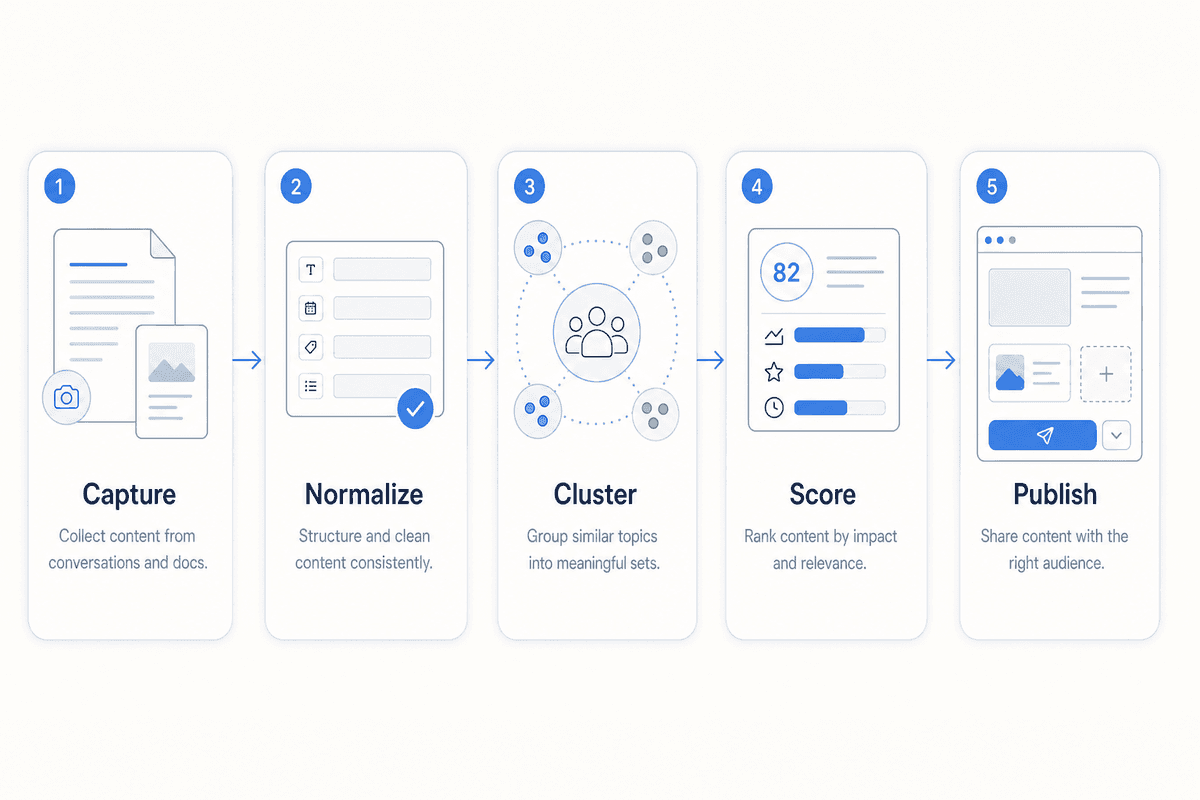
Questions are scattered across systems because customers don’t experience your company through a single department. Atlassian’s knowledge-management guidance points out that useful information often remains trapped in tickets, email, conversations, and individual employees’ knowledge. Bring those inputs into one intake sheet before trying to prioritize them.
For each question, record the source, original wording, date, audience stage, page or product area, outcome, and a link to the evidence. Add a separate field for the normalized question later.
Live chat reveals in-the-moment friction
Chat captures the question close to the moment it occurs. A visitor asking “Does this work with Shopify?” from an integrations page carries different context from a customer asking the same words during troubleshooting.
Save the visitor’s exact language, the page they were viewing, the answer given, and any follow-up. Follow-ups are especially useful: they show where the first response lacked a prerequisite, exception, or concrete next step. In our Live Chat & AI Assistant, page context and conversation history help connect the wording to the visitor’s situation.
Support tickets expose costly gaps
Ticket subjects rarely tell the full story. Read the thread and identify the underlying issue, how many exchanges it took to resolve, and which missing detail caused another reply.
Group tickets by issue family rather than exact wording. “I can’t sign in,” “reset link expired,” and “password email never arrived” may belong to one account-access cluster, but each can require a distinct section in the eventual troubleshooting article.
Sales calls capture buying objections
Ask sales representatives to record the prospect’s question and the approved answer, preferably in the prospect’s language. Pricing logic, implementation effort, product fit, security, and plan limits often surface here before they appear in support.
Keep one-off requests separate. A large prospect’s unusual procurement requirement doesn’t automatically justify a public article. Promote a call question when it repeats, affects a meaningful audience, or blocks an important decision.
On-site search shows what visitors expected to find
Site-search terms reveal both demand and vocabulary. Repeated searches, reformulated queries, and searches that return no useful result deserve attention. According to Google Analytics Help’s enhanced-measurement documentation, Google Analytics 4 can collect the view_search_results event when a results-page URL contains a recognized query parameter; the search_term parameter records the query. Google also warns against collecting personally identifiable information, so review your implementation and input handling before relying on this data.
Count frequency by unique conversation, account, or search session within a consistent period. Counting messages would let one difficult thread look like broad demand.
Turn messy wording into a clean question backlog
Raw questions are evidence, but they aren’t yet an editorial plan. Preserve the original wording in one field and add a normalized version in another. “Can I cancel whenever?” and “Is there an annual contract?” might normalize to “What are the subscription and cancellation terms?” Their original phrases remain useful for the title, headings, synonyms, and chat responses.
Cluster by information need
Look beyond the action someone requested. A visitor who asks for a demo may actually be uncertain about setup. A customer who asks for an agent may have encountered an undocumented error. The article should resolve the information gap that produced the request.
Tag each cluster by journey stage and question type:
Buyer question
Repeatable task
Troubleshooting issue
Policy or account question
Don’t merge away meaningful distinctions. The same billing question can have different answers by plan, region, or customer status. Remove names, email addresses, account details, and other personal information before a question enters the editorial backlog.
Score questions by frequency, friction, and business effect
ProjectHQ’s suggested editorial framework gives support, sales, and marketing a shared way to discuss priorities. Rate each cluster from 0 to 2 across four dimensions, then total the scores. Define “occasional” and “repeated” for your own review period before scoring; a small team may use different frequency thresholds from a high-volume support operation.
Criterion | 0 | 1 | 2 |
|---|---|---|---|
Frequency | Isolated | Occasional | Repeated across people or channels |
Friction | Easy answer | Some delay or follow-up | Repeated contact or blocked task |
Business effect | Low consequence | Affects progress | Blocks purchase, activation, or retention |
Coverage gap | Clear answer exists | Answer is buried or incomplete | No usable answer exists |
Frequency shouldn’t decide the queue by itself. A common, low-stakes question may save a little agent time. A less frequent security or implementation question could stop qualified buyers from moving forward. When scores tie, favor the cluster found across several channels or the one with the clearest verified answer.
A worked scoring example
Suppose a SaaS team records the visitor wording “Can I export every invoice as a CSV?” in three sales conversations during its monthly review period. The team normalizes it to “How does invoice CSV export work?” and has already defined three mentions in one channel as occasional rather than repeated demand.
Frequency: 1. The question appeared more than once, but only in sales calls and below the team’s threshold for a 2.
Friction: 1. Each prospect needed clarification, though nobody had to make repeated contact or abandon a task.
Business effect: 2. The export requirement determines whether those prospects can adopt the product.
Coverage gap: 2. No public page explains the export scope, required plan, or file contents.
The cluster scores 6 out of 8. It passes the publication gate only after the product owner verifies the export behavior, plan boundary, and fields included in the file. Because the answer needs scenarios and boundaries rather than a single sentence, the final format is a buyer-help article. If the behavior is still changing or the details can’t be published, keep the question in the backlog until the owner clears it.
Add a publication gate
A high score earns editorial attention. It doesn’t make the topic safe to publish. Before drafting, confirm that the answer is accurate, reasonably stable, appropriate for a public audience, and owned by someone who can approve changes.
Account-specific cases, sensitive exceptions, and volatile internal procedures usually belong in agent documentation or a direct conversation. They can still reveal a broader public topic, but the article should cover only the reusable portion.
Match each question to the right content format
Intercom’s comparison of FAQs and knowledge bases distinguishes concise FAQ content from the broader, more detailed material in a knowledge base. That distinction helps prevent both bloated answers and thin articles.
Format | Use it when | Typical structure |
|---|---|---|
FAQ answer | The answer is short, stable, and broadly applicable | Direct answer, essential condition, related link |
How-to article | The visitor wants to complete a repeatable task | Outcome, prerequisites, ordered steps, next action |
Troubleshooting guide | The reader must diagnose a symptom | Symptom, likely cause, fixes, escalation details |
Buyer-help article | The question affects fit or purchase confidence | Direct explanation, scenarios, boundaries, next step |
Bundle closely related questions when each answer is genuinely brief. Give a complex task or problem its own page so readers can find a complete resolution without scanning an oversized FAQ.
Convert the winning question into an article brief
Use the visitor’s language in the working title, then state the answer near the top. A help article loses value when readers must work through a long introduction before learning whether it applies to them.
A practical brief should specify:
The audience and situation
The exact question and verified answer
Prerequisites and ordered steps
Important exceptions or plan differences
The escalation path if the answer doesn’t resolve the issue
Related questions and internal links
The source owner, approver, and next review date
Product, billing, legal, security, and policy content needs review from the person responsible for that information. Marketing can improve clarity; it shouldn’t invent the rule.
The same discipline used in a strong search brief applies here: define intent, scope, evidence, and required coverage before drafting. Our guide to creating an SEO content brief writers can use provides a structure you can adapt, with resolution taking precedence over keyword expansion.
Run the feedback loop in ProjectHQ
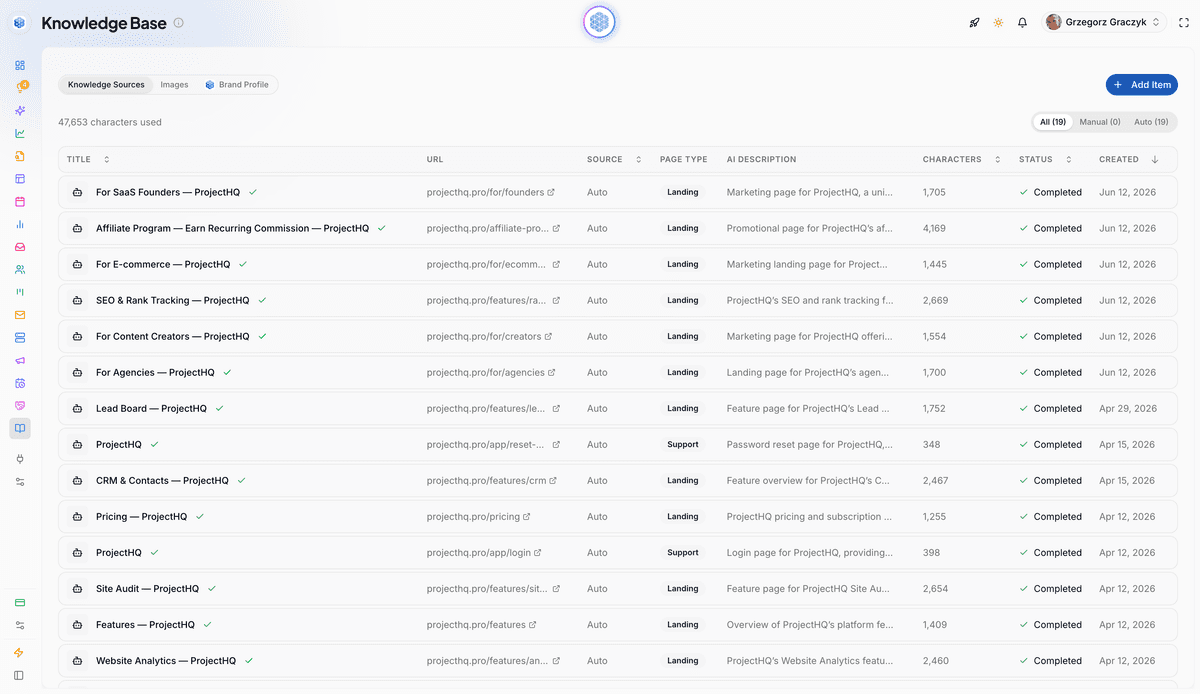
ProjectHQ connects two useful parts of this process. In our unified inbox, you can review conversation history and the page context surrounding a visitor’s question. Contact activity timelines add page views, chats, forms, and other interactions when you need to understand the broader journey.
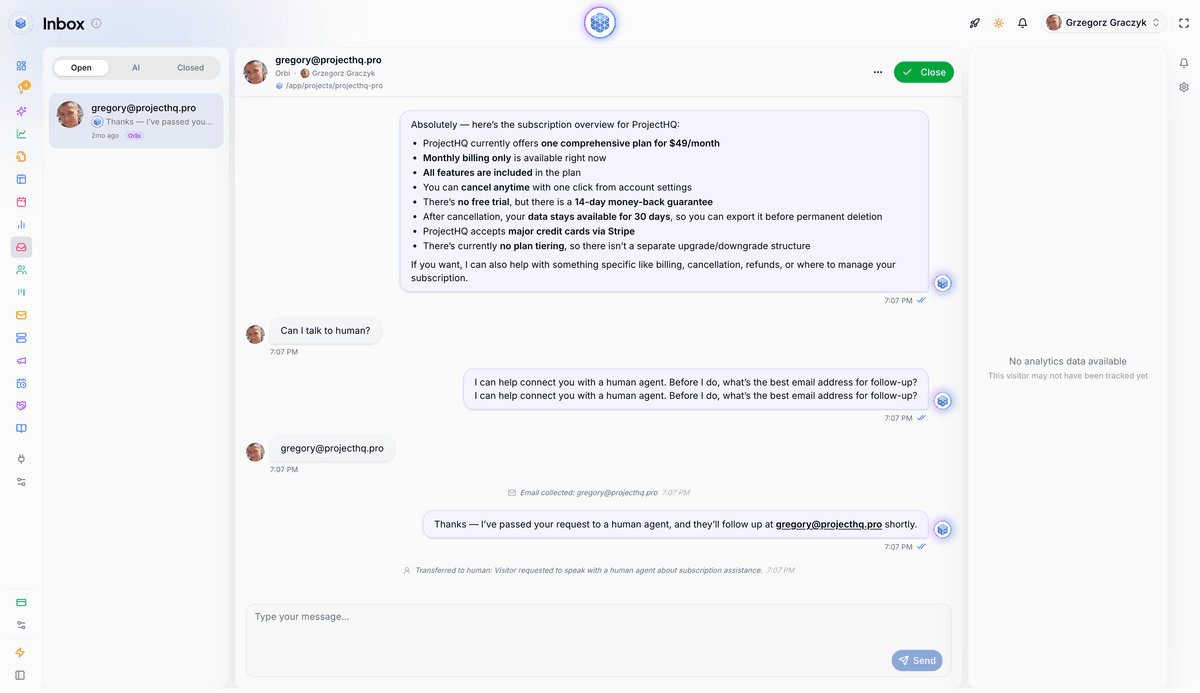
Once the answer has been verified and published, add its URL to our Knowledge Base. You can also add approved text or PDF sources. Our AI assistant searches those maintained business sources when answering visitors, so the published answer can help in both self-service content and future chats.
Questions captured in our inbox can be reviewed with their conversation and page context, then recorded in the editorial backlog for scoring. ProjectHQ’s Knowledge Base accepts approved URLs, text, and PDF sources after an answer has been verified; the prioritization backlog remains an editorial workflow.
Measure whether the answer removed friction
Article views show that content was used. The stronger test is what happens to the original question cluster afterward. Review chats and tickets for the same issue: Did repeated questions decline? Are visitors asking a narrower follow-up? Are agents still explaining a step the article omits?
For site search, inspect continued reformulations and no-result terms. A strong answer can still fail when its title uses internal jargon or the page is hard to find. For buyer-help content, look at whether the same objection keeps appearing on pricing or product pages and whether visitors take the intended next step. ProjectHQ analytics can show page and conversion behavior, while your chat, ticketing, and search systems provide their channel-specific evidence.
Review the highest-value clusters monthly. Update articles when the answer changes, consolidate pages that compete for the same question, and retire material that no longer applies. Then publish the next verified answer from the queue. That cadence is manageable for a small team and keeps the knowledge base tied to what visitors are asking now.
Grzegorz is the founder of ProjectHQ and has spent 15+ years in SEO — from technical audits to content strategy that ranks. He builds the product he writes about, so the playbooks here come from running real campaigns, not theory.
Ready to grow traffic?
Write SEO-optimized articles and track your rankings with ProjectHQ.
Get started