How to Connect AI Content, Chat, and SEO Tools in One Workflow
 Grzegorz Graczyk8 min read
A connected workflow gives your team something more valuable than faster drafting: it preserves the reason a visitor arrived, what they read, what they asked, and what happened next. That context can then shape the next article, page update, or conversion improvement.
Most teams already have the raw ingredients. Their SEO tool shows queries and rankings. Their AI writer produces drafts. Chat stores conversations, while analytics and CRM systems record separate pieces of the journey. The gap appears at each handoff. A writer never sees the questions prospects ask. A chat transcript loses the landing page that prompted it. A monthly report shows traffic without explaining which content generated qualified conversations.
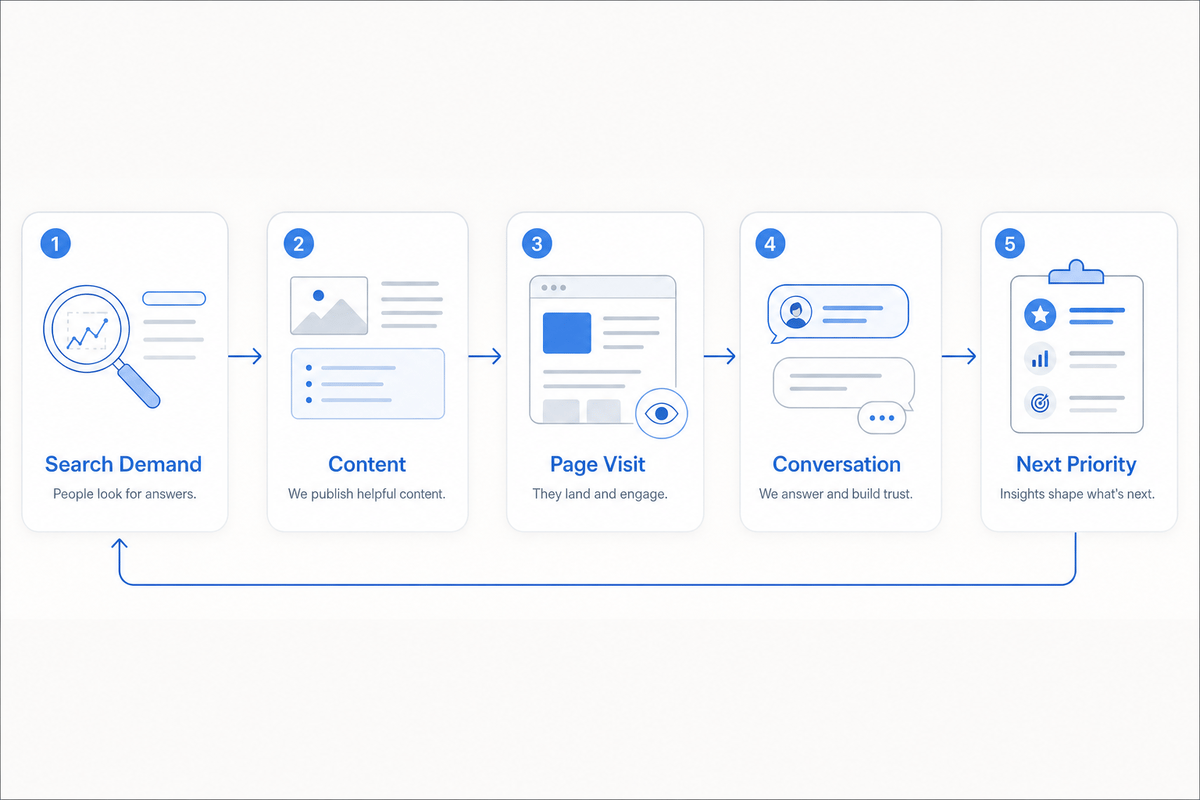
The fix is a closed operating loop: search demand informs content; content attracts visitors; visitor behavior and questions reveal friction; conversions and conversation patterns determine what the team improves next.
The minimum data contract
Before connecting software, decide what information must move between systems. This is your data contract: a short specification for the records, fields, owners, and rules shared across the workflow.
Keep it small. A useful first version includes the following objects:
Object | Context to preserve | Likely system of record | Owner |
|---|---|---|---|
Topic | Query, intent, target page, priority | SEO or content system | SEO/content lead |
Content page | Canonical URL, topic, status, publish date | CMS or content platform | Editor |
Visit | Landing page, source, campaign, pages viewed | Analytics platform | Marketing operations |
Conversation | Page context, exact question, answer, outcome | Chat inbox | Support or sales |
Contact | Identity, activity, lifecycle status, owner | CRM | Sales or customer team |
Outcome | Event name, source page, timestamp, value | Analytics or CRM | Marketing operations |
Use canonical URLs consistently so the same page doesn’t appear under several variants. Standardize campaign parameters and event names as well. Google Search Console groups performance by dimensions such as queries and pages, while Google Analytics uses events to measure actions such as link clicks, signups, and purchases. Clean naming makes those sources easier to interpret together.
Every automated handoff also needs a failure path. Define its trigger, required fields, duplicate-handling rule, failed-sync alert, retry procedure, and owner. Otherwise, an integration can quietly fail for weeks while everyone assumes someone else’s dashboard is complete.
Turn search demand into an approved content brief
The workflow begins with a decision, not a draft. Choose topics by combining search evidence with business context: queries earning impressions, attainable ranking gaps, recurring visitor questions, and the pages or offers the business needs to support.
The resulting brief should carry the important context into production:
The reader’s situation and dominant search intent
The target query and page this article should support
Verified claims and approved business sources
Required internal links and the natural conversion path
The event or outcome the team will review after publishing
The editor or subject-matter owner responsible for approval
This prevents a familiar problem: SEO research happens in one tool, then the writer receives only a keyword and suggested word count. Our guide to creating an SEO content brief writers can actually use provides a fuller specification.
In ProjectHQ, our AI Content Creation workflow combines keyword research, competitor analysis, outline generation, knowledge-base context, editing, and publishing. That keeps the rationale behind the article close to the draft instead of scattering it across tabs and spreadsheets.
Publish from a shared knowledge layer
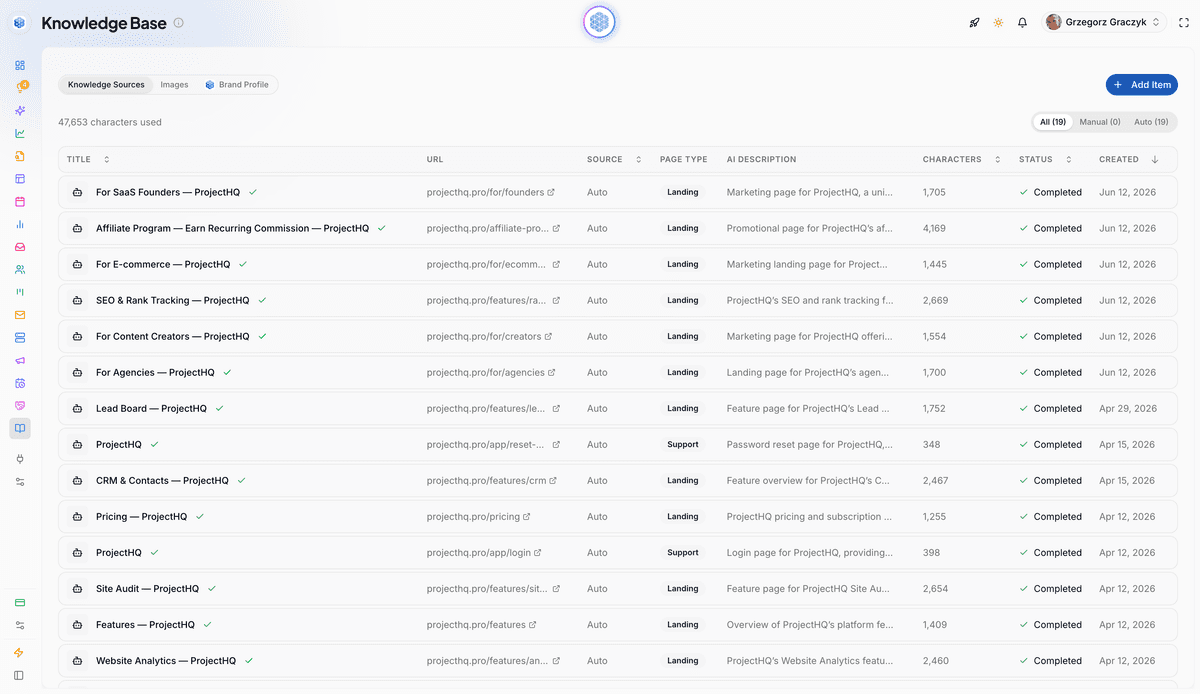
AI content and AI chat should draw from the same approved business facts. Product details, policies, documentation, brand guidance, and frequently used answers belong in a governed knowledge layer with clear source owners.
Our Knowledge Base accepts URLs, text, and PDFs. Relevant pages discovered during a site audit can be added automatically and synchronized on later crawls, while exclusion rules keep unsuitable pages out. Our content workflow can reference those sources when drafting, and our AI assistant searches the same maintained material when answering visitors.
Shared sources reduce contradictory language across articles and conversations. They don’t remove editorial responsibility. Pricing, security, policy, legal, and fast-changing product details still need approval from the person who owns the answer. An unverified statement from a chat transcript should enter a review queue, never become source material automatically.
Carry page context into the conversation
A visitor asking “Does this work with my store?” from a pricing page may warrant a higher-intent tag than someone asking it from a general blog post. Page location is one prioritization signal. Check it against the traffic source, pages viewed, conversation outcome, and later CRM progression before treating the question as evidence of buying intent.
For each chat-to-contact handoff, preserve the landing page, current page, traffic source or campaign, pages viewed, exact question, response, escalation status, and contact identity when the visitor provides it. If your chat and CRM are separate, test this path with real field values rather than trusting an integration checklist.
Our live chat assistant is page-aware and answers from our Knowledge Base. It handles follow-up questions, can collect an email before human escalation, and retains conversation history in the unified inbox. Each conversation creates or updates a contact record, allowing the team to review the question alongside that person’s activity rather than as an isolated transcript.
Convert conversations into the next content queue
Conversation data becomes useful when the team turns messy wording into a prioritized queue. Preserve the visitor’s exact words, then add a normalized question. “Can I leave whenever?” and “Do you require an annual contract?” may belong to one subscription-terms cluster, while the original phrases remain valuable for headings and chat responses.
Score each cluster using four practical criteria: frequency, friction, business effect, and the size of the coverage gap. A question asked twice may deserve attention before one asked 20 times if it blocks qualified buyers and has no public answer.
Then choose the appropriate destination. A short, stable answer may become an FAQ. A repeatable task needs a knowledge-base article. A buying objection may require clearer copy on a product or pricing page. A query with broader educational demand may justify a search-focused article. Sensitive or account-specific guidance belongs in agent documentation.
Before publishing, verify the answer with its owner. Our guide to finding website visitor questions for your knowledge base includes a detailed clustering and prioritization method.
Measure the chain from visibility to outcome
Measure the workflow in stages. Search Console reports impressions, clicks, CTR, and average position before the visit. On-site analytics records page activity and defined events. Chat adds questions and conversation outcomes. CRM records show which visitors became known contacts and how those contacts progressed.
The page URL is often the most practical join key. It lets the team ask a connected set of questions:
Which pages and queries attracted qualified visits?
What questions or points of friction appeared on those pages?
Which pages contributed to meaningful events, conversations, or contacts?
What content, answer, or conversion path should change next?
Set up the important event before publishing, then verify that it’s being collected. Google Analytics Help explains how to use Realtime and DebugView to confirm event collection. Waiting until a report is due usually means discovering that the desired action was never measured.
Keep attribution claims modest. A contact’s last click or one chat does not prove that a single article caused revenue. Use the available evidence to prioritize work, and report visibility, on-site behavior, conversations, and business outcomes as related layers. For stakeholder reporting, see our guide to building an SEO reporting dashboard that supports decisions.
Connected stack, hybrid setup, or one platform?
You can run this workflow through specialist products, a consolidated platform, or a combination of both. Tool count matters less than context continuity and operational effort.
Architecture | Best fit | Main tradeoff |
|---|---|---|
Connected specialist stack | Teams that need deep capabilities in several categories and can maintain integrations | More field mapping, monitoring, reconciliation, and failure recovery |
Consolidated platform | Small website-led teams whose content, SEO, chat, and lead workflows share the same context | Some specialist functions may have less depth |
Hybrid setup | Teams that want a connected growth workflow while retaining one or two critical specialist systems | Requires clear ownership at the remaining boundaries |
We built ProjectHQ for the second and third cases. Our connected feature set brings AI content, rank tracking, site auditing, analytics, knowledge, live chat, contacts, and lead handling into one system. A small team can move from a target query to a published page, capture related conversations, and review visitor and contact activity without reconstructing the journey from several exports.
Keep a specialist platform when advanced CRM automation, experimentation, compliance controls, or another revenue-critical function requires greater depth. If you’re evaluating that boundary, our framework for replacing multiple marketing tools with one platform covers capability gates, migration cost, and hybrid options.
A 30-day rollout for one complete loop
Week 1: Specify the journey
Choose one search-focused page or topic. Inventory the tools involved, assign owners, define the shared fields and events, and record the current number of manual transfers. Establish which system owns each record.
Week 2: Build and publish
Clean the approved knowledge sources, create the brief, publish the page, and validate its canonical URL, analytics collection, and intended conversion event. Fix tracking before promoting the content.
Week 3: Test conversation and contact handoffs
Ask realistic questions from the published page. Confirm that chat retains the page context, escalation reaches the right inbox, and contact creation doesn’t produce duplicates. Trigger a failed or incomplete path deliberately so the team knows how recovery works.
Week 4: Close the loop
Review the available search, page, event, conversation, and contact evidence. Cluster the questions, score the highest-value gap, and assign one resulting action. That action might be a page clarification, a knowledge-base answer, a content refresh, or the next brief.
The pilot passes when the source URL remains attached to the journey, important events are visible, answer sources are verified, failed handoffs can be recovered, and one person owns the next decision.
Start with one journey, then widen the loop
Don’t begin with a full-stack rebuild. Prove one complete journey using one search-focused page, the conversations it generates, one meaningful conversion, and one resulting content decision. Once the context survives that loop, expand it to more content types, campaigns, and customer questions.
If manual handoffs are already the constraint, ProjectHQ gives a small team the shared knowledge and connected operating system to run this workflow in one place. The goal is straightforward: every useful signal should reach the person making the next decision.
Grzegorz is the founder of ProjectHQ and has spent 15+ years in SEO — from technical audits to content strategy that ranks. He builds the product he writes about, so the playbooks here come from running real campaigns, not theory.
Ready to grow traffic?
Write SEO-optimized articles and track your rankings with ProjectHQ.
Get started