When to Replace Multiple Marketing Tools With One Platform
 Grzegorz Graczyk9 min read
A consolidated platform should give your team time back within ordinary work: publishing a page, understanding its traffic, answering a visitor, and following up with the resulting lead. If the change only reduces the number of invoices while creating weaker workflows, you haven’t simplified anything.
That’s the useful test for when to replace multiple marketing tools with one platform. Count handoffs, capability gaps, and migration risk before you count apps. The right answer may be full consolidation, a smaller hybrid stack, or no change at all.
Tool count is the wrong starting point
Start with the work that moves through your stack. A website-led marketing team might research a query, create an article, track its ranking, measure visits, answer questions about the offer, and add interested visitors to a contact pipeline. Draw that workflow from beginning to end and mark every place where a person or integration moves information between systems.
Those transitions are where fragmentation becomes expensive. A UTM convention differs across analytics and CRM. A chat transcript lacks the pages the visitor viewed. A writer copies product facts from old documents because the content tool can’t use the current knowledge base. Reporting becomes a monthly reconstruction project.
Four specialist tools can still be an excellent stack when their handoffs are dependable and their deeper capabilities matter. Platform consolidation is useful when it removes recurring operating friction while preserving the work the business relies on. If you’ve already decided that consolidation makes sense, our guide to choosing an all-in-one marketing platform covers the next stage of vendor evaluation.
The strongest signs consolidation will help
Manual handoffs have become normal
Watch for repeated exports, copied fields, duplicate campaign setup, and contact-status updates made in two places. One occasional CSV isn’t a business case. A weekly process that requires three exports, a spreadsheet cleanup, and a manual CRM update deserves attention.
Keep a friction log for two normal working weeks. For each incident, record the workflow, people involved, elapsed time, rework, and consequence. Include broken automations and time spent checking whether an integration ran. This turns “we have too many tools” into evidence you can price and prioritize.
Basic questions require a reporting project
Fragmentation is especially costly when each tool defines the customer journey differently. SEO data shows rankings, analytics shows sessions, chat stores conversations, and CRM holds contacts, yet no view explains how those events connect.
Reporting should lead to a decision. If the team spends most of its reporting time reconciling sources, first simplify the questions and ownership model. Our guide to building an SEO reporting dashboard people will actually read is a useful baseline. It helps distinguish a tool problem from a dashboard that simply contains too much.
Administration competes with marketing
Subscription fees are only the visible layer. Each application brings access reviews, billing, renewals, onboarding, documentation, and support. Integrations require monitoring. Team members need to remember which system owns which field.
This burden is most pronounced when one or two people handle content, SEO, analytics, chat, and lead follow-up. Zylo’s guidance on platform consolidation similarly recommends evaluating total ownership cost, redundant functionality, interoperability, and business fit rather than cutting tools by count alone.
When separate tools should stay separate
Consolidation is a poor trade when the candidate platform misses a capability tied to revenue, compliance, or a core operating process. A broad platform’s basic CRM won’t necessarily replace advanced territory management and sales automation. Straightforward website analytics may be insufficient for a dedicated experimentation team with a mature event model.
Create a short list of requirements that can block the purchase. Typical gates include:
A must-have workflow the new platform cannot complete at the required depth
Unacceptable export, retention, permissions, security, or compliance terms
A required integration that cannot be tested with real data
Migration timing that collides with a launch, redesign, peak season, or board reporting cycle
A hybrid stack is often the sensible destination. Consolidate the connected website-growth workflow and retain a specialist system for advanced email automation, enterprise CRM, experimentation, or another genuinely differentiated job. The goal is lower friction, not software purity.
Calculate the real cost on both sides
Compare the next 12 months from the decision date. Previous implementation spending is sunk; it shouldn’t keep an unsuitable stack alive or make a new platform look artificially cheap.
Cost category | Current stack | Candidate platform |
|---|---|---|
Visible cost | Subscriptions, seats, add-ons, usage charges | Plan, usage limits, add-ons, retained specialist tools |
Operating cost | Administration, training, integrations, duplicate entry, reporting reconciliation | Governance, training, workflow changes, any remaining connections |
Switching cost | None if you stay, aside from planned upgrades | Setup, cleanup, migration, validation, parallel subscriptions, temporary slowdown |
Risk cost | Integration failures, fragmented data, vendor renewals, inconsistent access | Capability gaps, vendor concentration, data loss, downtime, future exit work |
A simple first-year comparison is:
First-year platform cost = new subscription + retained tools + migration labor + parallel-run cost + expected risk cost.
Compare that total with the current stack’s subscriptions and operating labor. Use loaded labor rates if you have them. If you don’t, record hours and show them separately rather than pretending team time is free.
Migration work is easy to undercount. Insider One’s marketing technology migration guide highlights stakeholder alignment, data audits, integration tests, template transfer, and end-to-end testing. Those tasks belong in the budget before approval.
A scorecard for the go or no-go decision
We recommend a five-part house scorecard. Rate each dimension from 1 to 5, multiply it by the weight, and add the results. Use evidence from your own workflows, sample exports, and pilot rather than vendor checkmarks.
Dimension | Weight | What earns a high score |
|---|---|---|
Must-have capability coverage | 30% | Critical workflows work at the required depth with realistic inputs |
Handoff reduction | 25% | Repeated exports, duplicate entry, and integration maintenance disappear |
Data continuity | 20% | Required records remain accurate, accessible, exportable, and properly governed |
12-month economics | 15% | Savings remain meaningful after migration labor and retained tools are included |
Reversibility and vendor fit | 10% | Support, terms, exports, and an eventual exit path meet your requirements |
Apply the gates first. A failed compliance requirement, critical workflow, or data-continuity test blocks full replacement regardless of the total.
With all gates cleared, a weighted score of 4.0 or higher makes a strong consolidation case. A result from 3.0 to 3.9 supports a limited pilot or hybrid stack. Below 3.0, keep the current stack and fix the highest-cost point of friction. These thresholds are a practical decision aid, not an industry standard; adjust weights before scoring if your business has different priorities.
Worked example: a hybrid decision
Consider a hypothetical team that scores capability coverage at 4, handoff reduction at 5, data continuity at 2, 12-month economics at 4, and reversibility and vendor fit at 4. The weighted calculation is (4 × 0.30) + (5 × 0.25) + (2 × 0.20) + (4 × 0.15) + (4 × 0.10) = 3.85.
That total falls in the pilot-or-hybrid range. More decisively, the data-continuity test failed because the team couldn’t validate the transfer of required consent records. The decision is therefore hybrid: move the content, SEO, analytics, and chat workflow into the candidate platform, but keep the existing CRM as the authoritative record until consent history can be transferred and verified.
Migrate in stages, not in one cutover
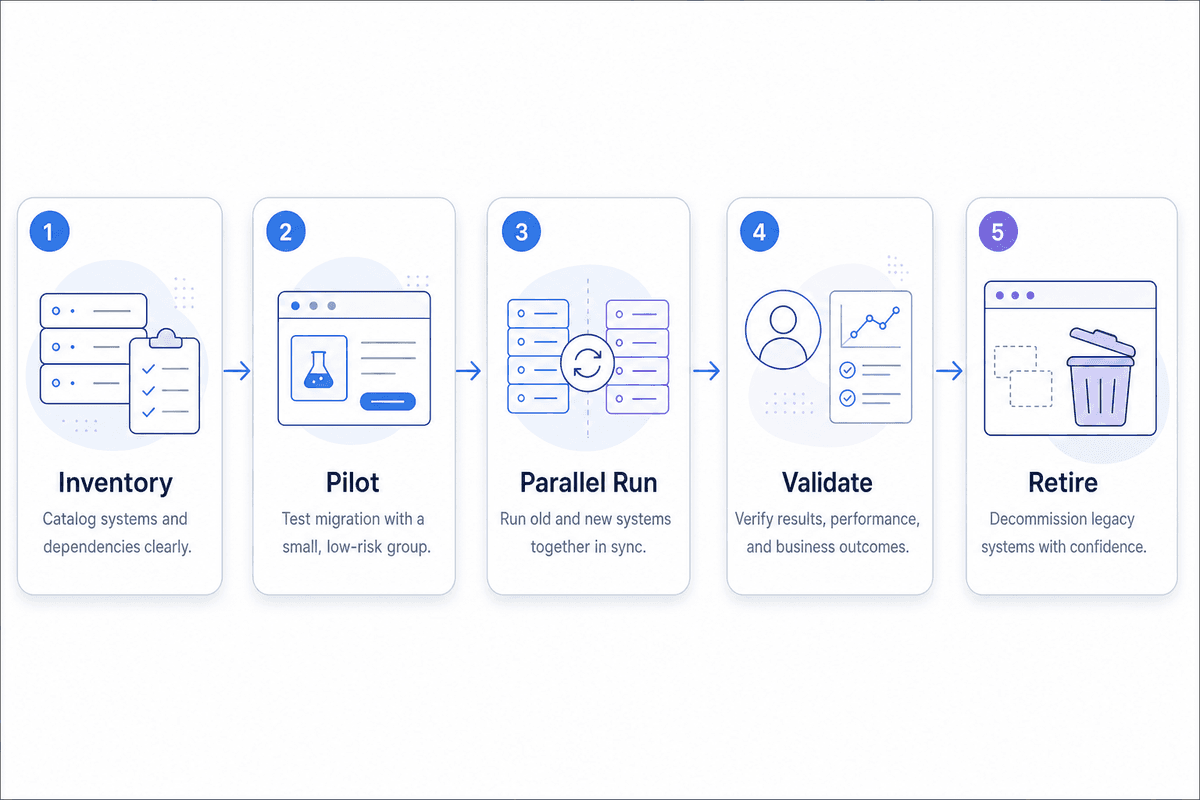
Inventory the dependencies
List every tool in scope along with its owner, renewal date, users, integrations, reports, automations, stored assets, and data-retention obligations. Identify which system is authoritative for each important field. Include unofficial spreadsheets and manual procedures because they often carry the missing context.
Content, knowledge articles, and templates need the same treatment as contacts and tracking data. The inventory method in our SEO content audit checklist can help you decide what to keep, update, combine, redirect, or retire before moving a cluttered library.
Pilot one complete workflow
Choose a workflow with visible friction and manageable risk. For example, publish one search-focused article, track its performance, capture a related chat inquiry, and verify that the contact record contains the context needed for follow-up.
Measure the old workflow first: number of steps, elapsed time, manual transfers, errors, and usefulness of the final output. Run the pilot under normal conditions. A polished demo proves very little about messy source data, ordinary permissions, or real team habits.
Run tracking in parallel
Keep old and new collection active while you compare traffic, campaign attribution, contact creation, and routine reports. Perfect numerical agreement may be unrealistic when systems use different definitions, but discrepancies must be understood and documented before anyone treats the new dashboard as authoritative.
Separate information that must move from information that should be archived. Contacts, tags, consent records, keyword lists, and current knowledge sources may need active migration. Historical analytics often needs a durable export, a named storage location, and instructions for future access rather than import into a system with a different data model.
Validate, then retire
Assign an owner to sign off on each critical workflow. Store final exports, remove obsolete integrations, update process documentation, and check renewal dates before cancellation. Keep the rollback path open until the new platform has survived routine work and the old data is safely accessible.
Where ProjectHQ fits the consolidation case
We built ProjectHQ for website-led small teams that want content, SEO, analytics, knowledge, live chat, and lightweight contact management working from connected context. You can review the complete scope on our features page.
One website-growth workflow
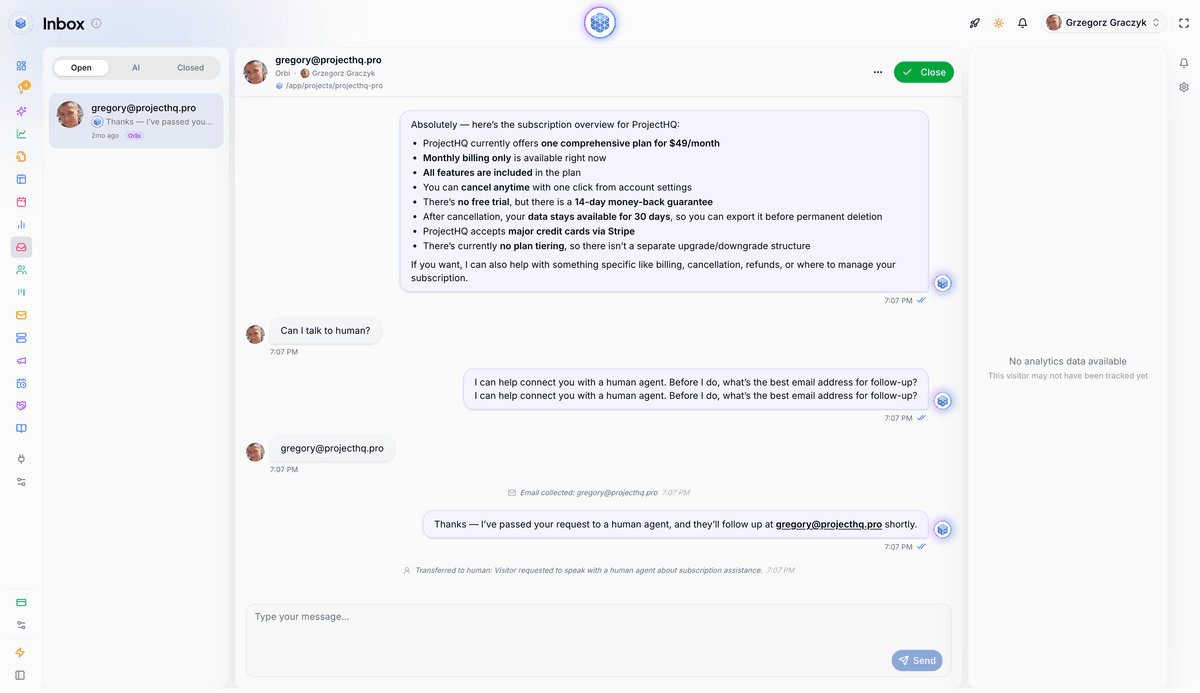
Our site audit crawls the website and feeds relevant pages into the knowledge base. The content workflow combines search research with business information from those sources. Our AI chat assistant uses the same material to answer visitors, handles follow-up questions, and lets a person take over the conversation. Chat activity flows into contact profiles, while website analytics shows what visitors read and how they arrived.
This shared knowledge layer matters when content and chat need consistent product, service, and policy information. If that’s a priority, use our guide to building a website knowledge base that reduces support tickets to plan the sources and ownership before you migrate them.
Setup, history, and scope
Setup begins by adding your domain and installing a lightweight snippet. From then on, analytics collects new website activity and live chat records new conversations. Preserve historical records from prior tools according to the archive plan rather than assuming they’ll appear automatically in a new data model.
Reversibility belongs in the evaluation too. If you cancel ProjectHQ, you have 30 days to export your content, analytics, and contact data before it’s permanently deleted, as explained in our pricing FAQ.
Our connected core is a strong fit when the website is the center of content, discovery, visitor engagement, and lead capture. Teams that require an enterprise CRM, complex outbound automation, or specialized analytics may keep those systems and use ProjectHQ to consolidate the website-growth portion of the stack.
The connected workflow in ProjectHQ
The sequence below shows how website knowledge becomes usable in a visitor conversation. The final contact-activity view still needs a current product screenshot so readers can inspect the handoff rather than taking it on trust.
1. Crawled pages become knowledge sources
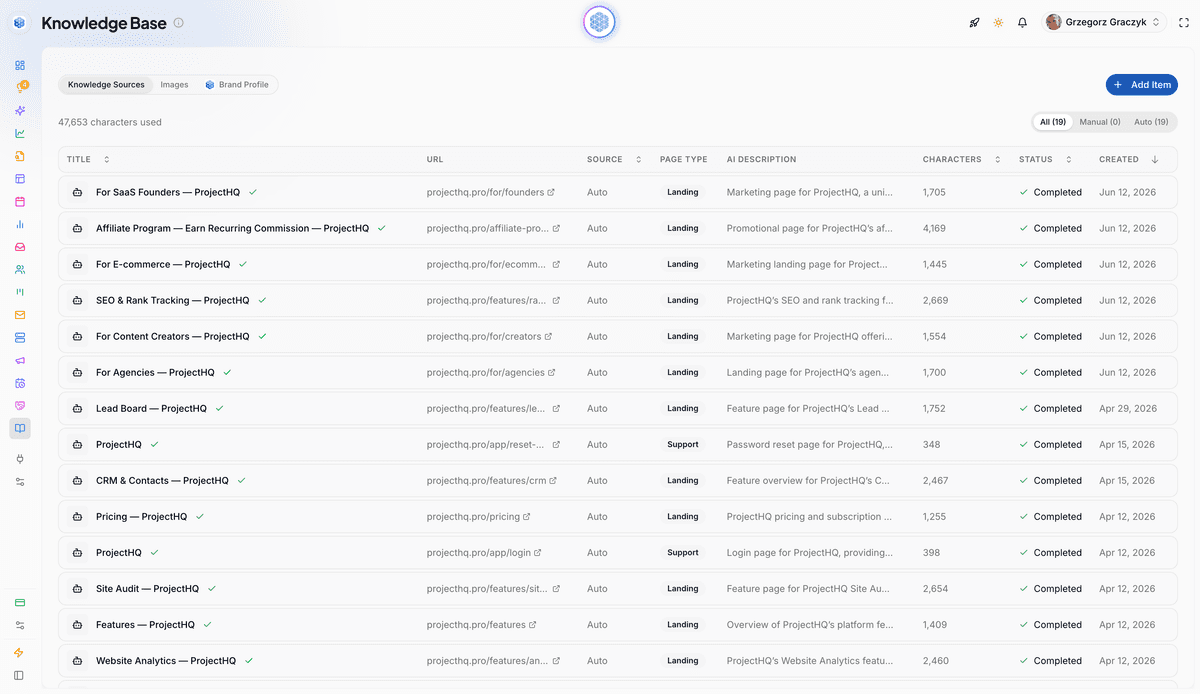
Crawled pages are listed with their URL, page type, AI description, character count, and processing status.
2. The assistant answers and offers human handoff
Make the next decision small and reversible
Pick one workflow that generated repeated friction during your two-week log. Establish its current time, cost, error rate, and output quality. Then run that same workflow in the candidate platform with your data and your team. Set a decision date before the pilot begins.
Replace the broader stack only if the platform clears every hard gate, improves the weighted score, and survives the parallel run. For a website-led small team, ProjectHQ can be the candidate you test. Use the same demanding scorecard you would apply to any vendor; the evidence from your own workflow should make the decision.
Grzegorz is the founder of ProjectHQ and has spent 15+ years in SEO — from technical audits to content strategy that ranks. He builds the product he writes about, so the playbooks here come from running real campaigns, not theory.
Ready to grow traffic?
Write SEO-optimized articles and track your rankings with ProjectHQ.
Get started