How to Build a Website Knowledge Base That Reduces Support Tickets
 Grzegorz Graczyk13 min read
If your team keeps answering the same questions by email, live chat, or support tickets, you do not just have a support problem. You have a publishing problem.
A strong website knowledge base gives customers and prospects a faster way to solve issues on their own. Sources such as Atlassian and Contentful describe self-service knowledge bases as a way to help people find answers without waiting for support, which can reduce repetitive requests and speed up simple issue resolution. On commercial pages, clear answers can also remove buying friction by helping visitors resolve questions before they leave. That makes a knowledge base both a support asset and, in many cases, a conversion aid.
This guide explains how to build a website knowledge base that actually reduces support load. It covers what to publish first, how to organize content, where to surface answers across your site, how AI fits in, and how to measure whether your help content is working.
Why a website knowledge base matters beyond support
A knowledge base is a centralized, searchable library of answers, instructions, and explanations. Atlassian describes it as a self-serve online library that helps people find answers without opening a ticket, while Contentful notes that self-service content helps customers solve problems without waiting on a support team.
That matters because visitors rarely separate “support” from “buying.” A prospect comparing plans may have a billing question. A trial user may need setup help. An existing customer may be troubleshooting a feature. In all three cases, the same thing determines what happens next: whether they can find a clear answer quickly.
When your knowledge base is useful, several positive outcomes are more likely:
Support volume drops because basic questions no longer require a human response.
Resolution gets faster because customers can solve simple issues immediately.
Conversion friction decreases because pre-purchase questions are answered in context.
Consistency improves because your team and your customers reference the same source of truth.
That is also why a knowledge base pairs naturally with tools like live chat and AI assistance. If the documentation is strong, self-service gets stronger. If the documentation is weak, chat and support simply inherit the confusion.
Start with the questions that already create support load
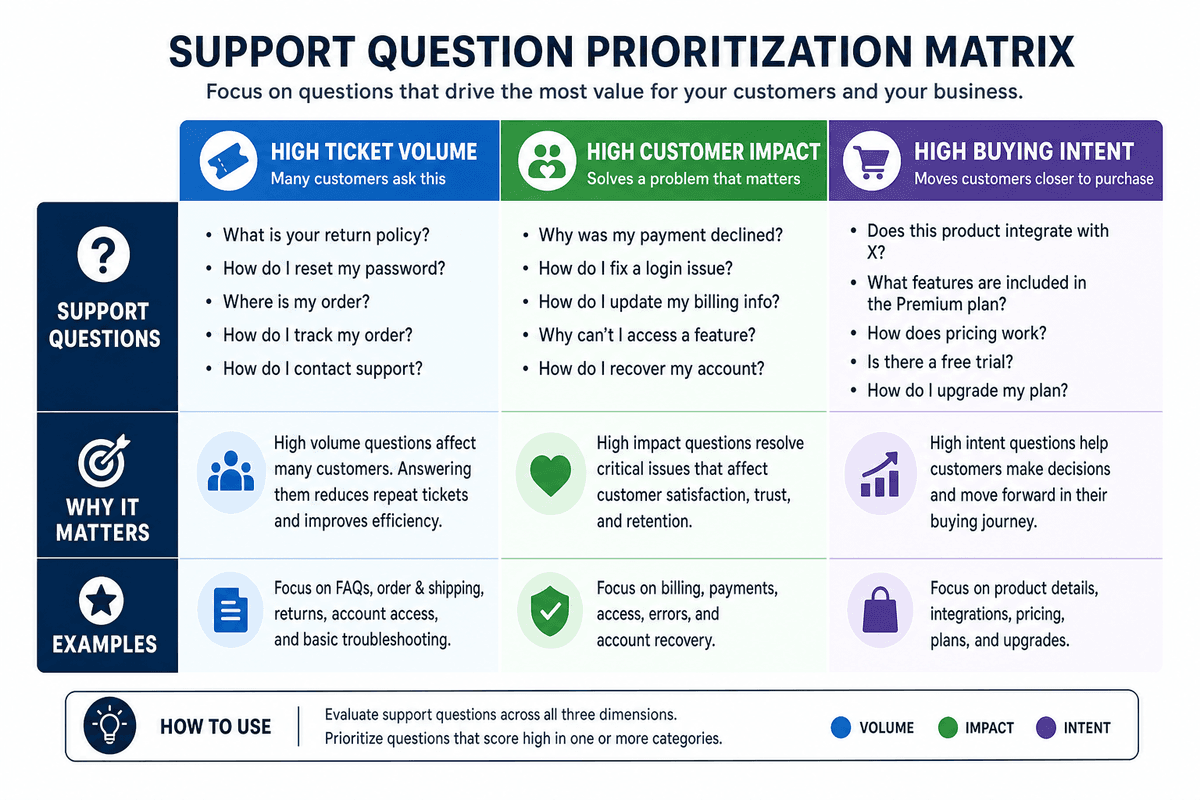
The fastest way to build a useful knowledge base is not to document everything. It is to document the questions that already cost you time.
Find the highest-friction questions
Start with the sources that reflect real customer confusion:
Support tickets and email threads
Live chat transcripts
Sales call notes
Onboarding questions
Internal Slack or team message threads
Site search queries and help-center search terms
Atlassian recommends gathering FAQs from any department that provides service, not just support. That is good advice because recurring questions often start in sales, onboarding, billing, or product education before they ever become formal support tickets.
Prioritize by impact, not by completeness
Zendesk and other help-center guides consistently point to the same broad best practice: start with the most useful content, then improve over time. That means your first wave of articles should focus on topics with the biggest payoff.
Prioritize each topic using three questions:
How often does this question appear?
How much frustration or delay does it cause?
Does it affect buying, onboarding, or retention?
A password-reset article may reduce repetitive tickets. A pricing-limits article may help some visitors keep moving instead of leaving to ask for clarification. A setup guide may ease early onboarding friction. All are valuable, but some topics are more commercially or operationally important than others.
Start with a tight first batch
As a practical starting point, many teams can begin with a focused batch of roughly 10 to 20 articles covering:
Getting started
Account access
Billing and plan questions
Most common troubleshooting steps
Top feature how-tos
Policies customers frequently ask about
This approach is far more effective than launching a large but unfocused help center full of thin pages.
Design a structure people can scan in seconds
The best knowledge bases are easy to search, but they are also easy to browse. Search will not save a confusing structure.
Use a small set of clear top-level categories
Keep your main navigation simple. For most websites, a structure like this works well:
Getting started
Account and login
Billing and plans
Features and workflows
Troubleshooting
Integrations
Policies and security
Contentful emphasizes that an effective knowledge base is structured and searchable. Simple categories help with both. If your users have to guess whether an answer is under “resources,” “guides,” or “support,” your taxonomy is too vague.
Write titles like search queries
Article titles should sound like what users would actually type:
Good: How to change your billing email
Good: Why my integration is not syncing
Bad: Managing account communications
Bad: Sync behaviors overview
Zendesk recommends short, concise titles with the main keywords customers search for. In practice, that means answer-first language and minimal jargon.
Standardize the page format
Every article does not need to look identical, but it should feel familiar. A consistent template makes content easier to scan and easier to maintain. At minimum, most help articles should include:
A direct summary of the answer
Who the article is for
Any prerequisites
Step-by-step instructions
What to do if the fix does not work
Links to related articles
If you are using a dedicated system like ProjectHQ’s knowledge base, keeping sources centralized also makes it easier to maintain one authoritative version of product, policy, and support information.
Separate public help from internal knowledge when needed
Some information belongs in a customer-facing knowledge base. Some belongs in an internal one. Public content should help users solve problems, understand your product, and make decisions. Internal-only content can cover agent workflows, escalation rules, refund edge cases, or sensitive process details.
That separation improves clarity and reduces the risk of publishing content that was meant only for your team.
Create article formats that actually resolve tickets
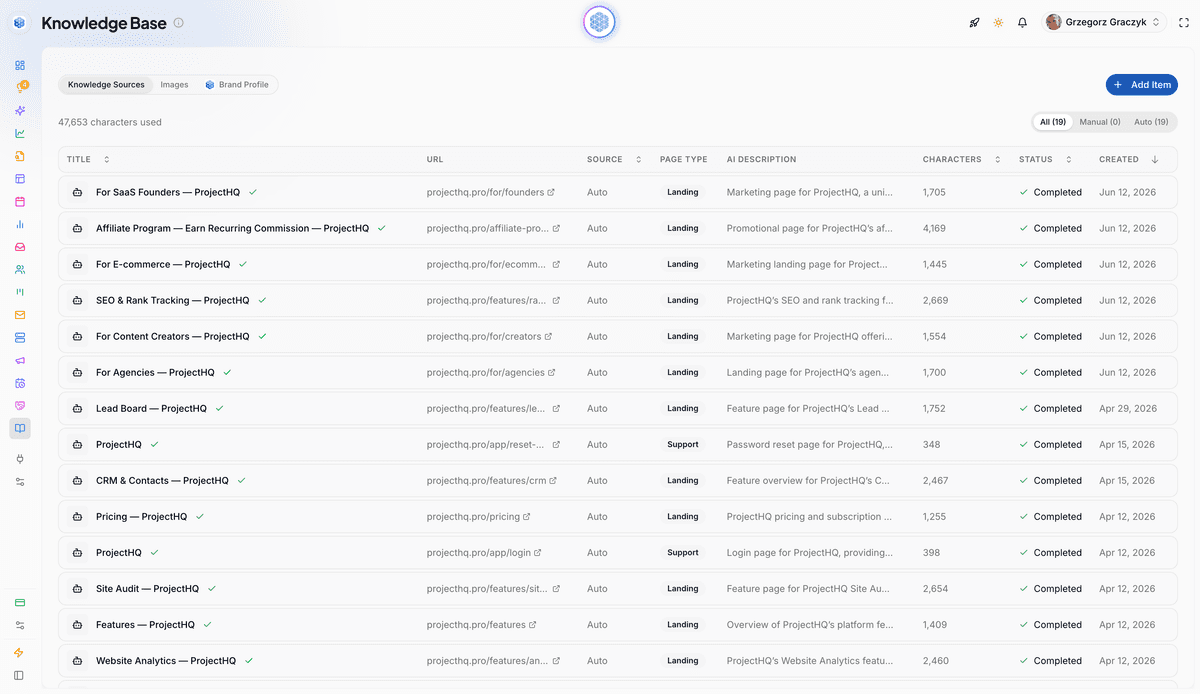
Not every support problem is solved by the same type of content. A useful knowledge base includes several article formats, each designed for a different kind of question.
FAQ articles for simple recurring questions
Use FAQ-style pages for short, high-frequency questions such as:
What payment methods do you accept?
Can I change plans later?
Do you offer refunds?
How do I invite a teammate?
These articles should answer the question in the first sentence, then add only the detail needed to prevent follow-up confusion.
How-to guides for repeatable tasks
These are the backbone of most help centers. Good how-to articles explain one task from start to finish, such as setting up a dashboard, connecting an integration, exporting data, or configuring notifications.
Strong how-to guides usually include:
The exact outcome the user will achieve
A short list of prerequisites
Numbered steps in order
Troubleshooting notes for common mistakes
Next-step links for related actions
If your team creates lots of instructional content, it helps to use the same content discipline you would use for marketing content. An article brief can keep writers aligned on user intent, scope, and missing details. For that process, this guide on how to create an SEO content brief that writers can actually use offers a useful framework you can adapt for help content too.
Troubleshooting articles for problem resolution
Troubleshooting articles should not read like feature descriptions. They should help a user diagnose a problem quickly.
A practical troubleshooting template looks like this:
Symptom: what the user is seeing
Likely causes: the most common reasons
Fix steps: ordered from simplest to more advanced
If it still fails: what information to collect before contacting support
This format reduces back-and-forth because users can rule out basic causes before escalating.
Buyer-help articles for conversion friction
Many teams forget that a knowledge base can support sales as well as support. Articles about pricing logic, implementation expectations, plan differences, security basics, and integrations can prevent buyers from leaving your site to ask a question elsewhere.
That is especially useful if your product has multiple workflows or feature sets. Articles that explain fit, setup time, or limitations can help visitors qualify themselves faster and contact your team only when they have a higher-value question.
If you use AI-assisted publishing workflows, a tool like ProjectHQ’s AI Content Creation can help teams produce structured, consistent help content faster, but speed only helps if the underlying facts are accurate and the scope is tightly defined.
Surface answers on the pages where questions happen
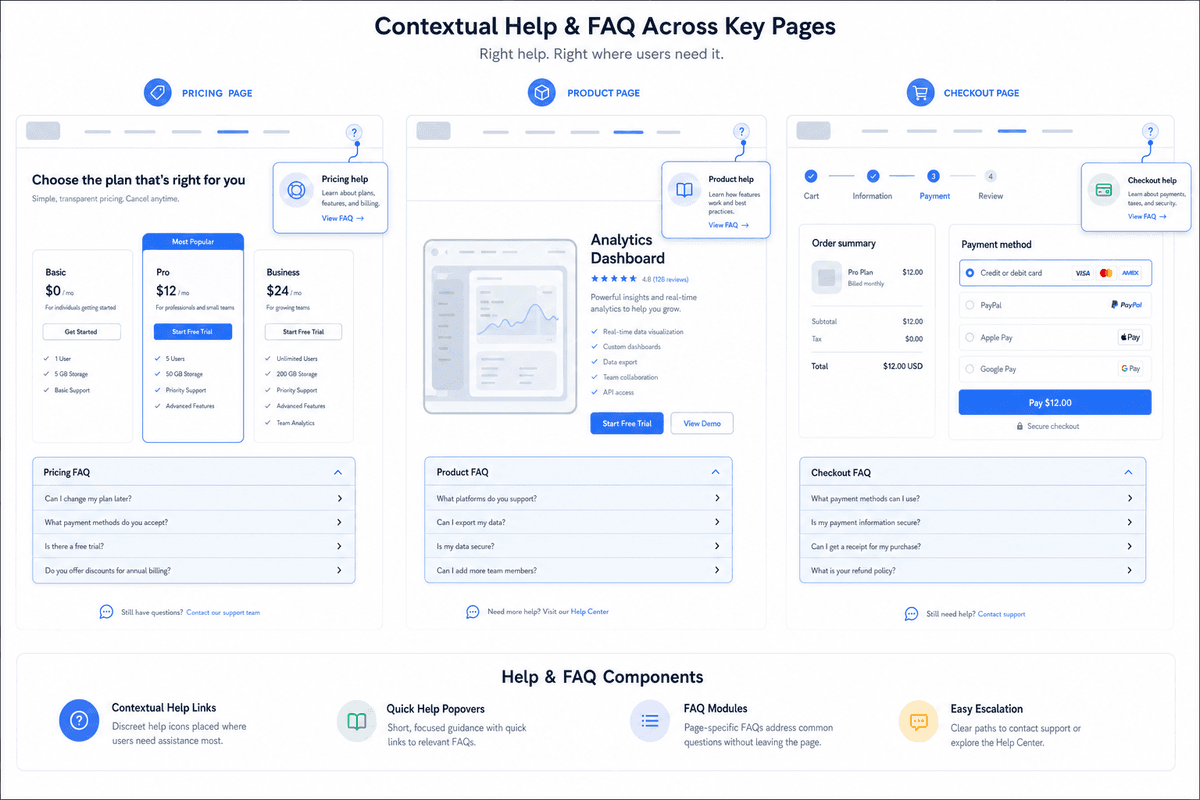
One of the biggest mistakes companies make is treating the knowledge base like a separate destination that customers must remember to visit.
In reality, the most effective self-service answers often appear before a visitor opens the help center.
Link help content from high-friction pages
Review the pages where hesitation or confusion tends to happen:
Pricing pages
Product feature pages
Signup and onboarding flows
Checkout pages
Account settings pages
Error states and empty states
Then place targeted help links on those pages. For example:
On a pricing page, link to billing FAQs and plan-limit explanations.
On an integrations page, link to setup and troubleshooting guides.
On a signup page, link to getting-started answers and implementation expectations.
This is one reason a knowledge base supports conversion. It removes uncertainty at the moment uncertainty appears.
Use contextual FAQs instead of forcing navigation
Zendesk highlights the value of making search and FAQs obvious and easy to reach. That principle applies across your site, not just inside the help center. A small FAQ module or “common questions” section on important pages can absorb objections without sending users into a maze.
For example, a product page might answer:
How long setup usually takes
Whether a credit card is required
What integrations are supported
How support and onboarding work
Those are not throwaway details. They are often the exact questions standing between interest and action.
Make support available in context
If users still need help, they should be able to ask for it without losing their place. That is where embedded chat can work well, especially when it is grounded in your existing documentation. ProjectHQ’s Live Chat & AI Assistant, for example, is designed to answer questions from the knowledge base and use page context when responding. That is a practical model because the system can try self-service first while keeping human escalation available when needed.
Use AI assistance to improve self-service, not replace clarity
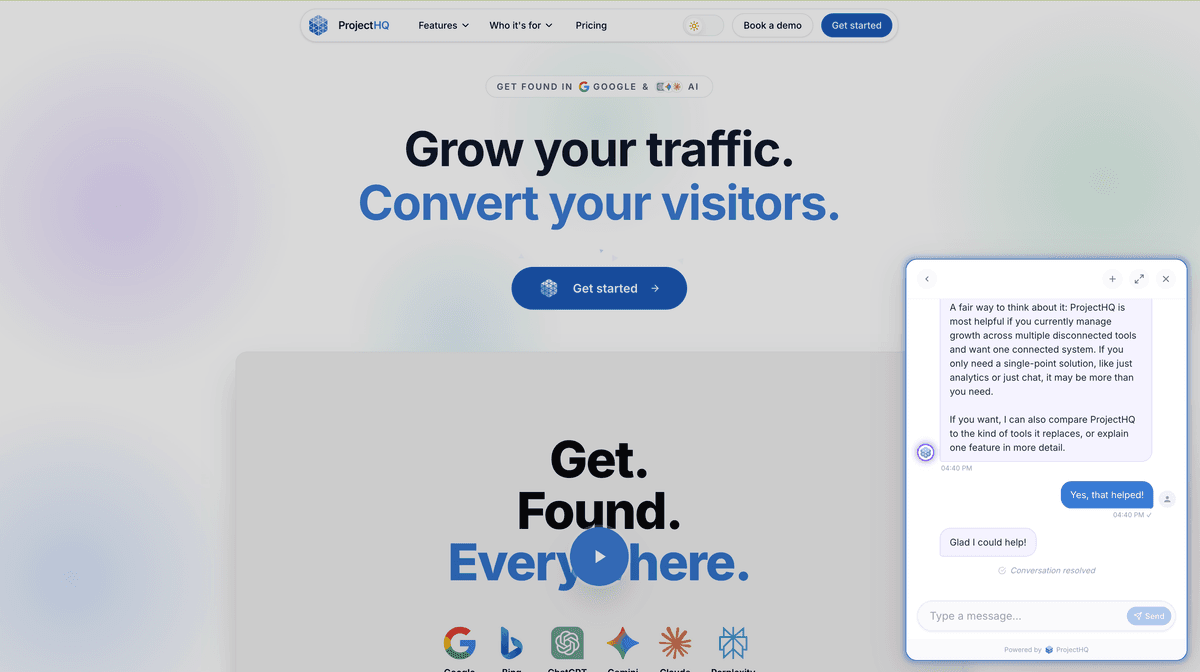
AI can absolutely help reduce support tickets, but only when it has something reliable to work from.
AI is only as good as the knowledge behind it
Contentful notes that a knowledge base can serve as the information resource AI chatbots learn from for automated support. That is the right mental model. AI is a delivery layer, not a substitute for documentation.
If your help content is outdated, contradictory, or incomplete, an AI assistant will not solve the problem. It will amplify it.
Use AI for the routine layer
The best use of AI in self-service is usually straightforward:
Answer repetitive product and policy questions
Handle follow-up clarification
Suggest relevant articles
Collect context before handoff
Escalate to a human when needed
This keeps support agents focused on exceptions, sensitive cases, and complex troubleshooting.
Build one source of truth first
ProjectHQ’s Knowledge Base follows this sequence at the feature level. Its product documentation describes a centralized source of truth that can pull from URLs, text, PDFs, and auto-crawled site content, and the same knowledge base is described as powering other AI features, including chat. In practice, that setup can make it easier to maintain one shared documentation source across support and content workflows.
Always keep human handoff available
AI should not trap users. Some questions involve billing exceptions, account-specific issues, or edge cases that require a human. ProjectHQ’s chat documentation specifically notes human handoff and unified inbox management. That feature set supports a sensible pattern: use self-service for routine questions, while keeping legitimate escalation paths open.
Measure whether the knowledge base is actually reducing tickets
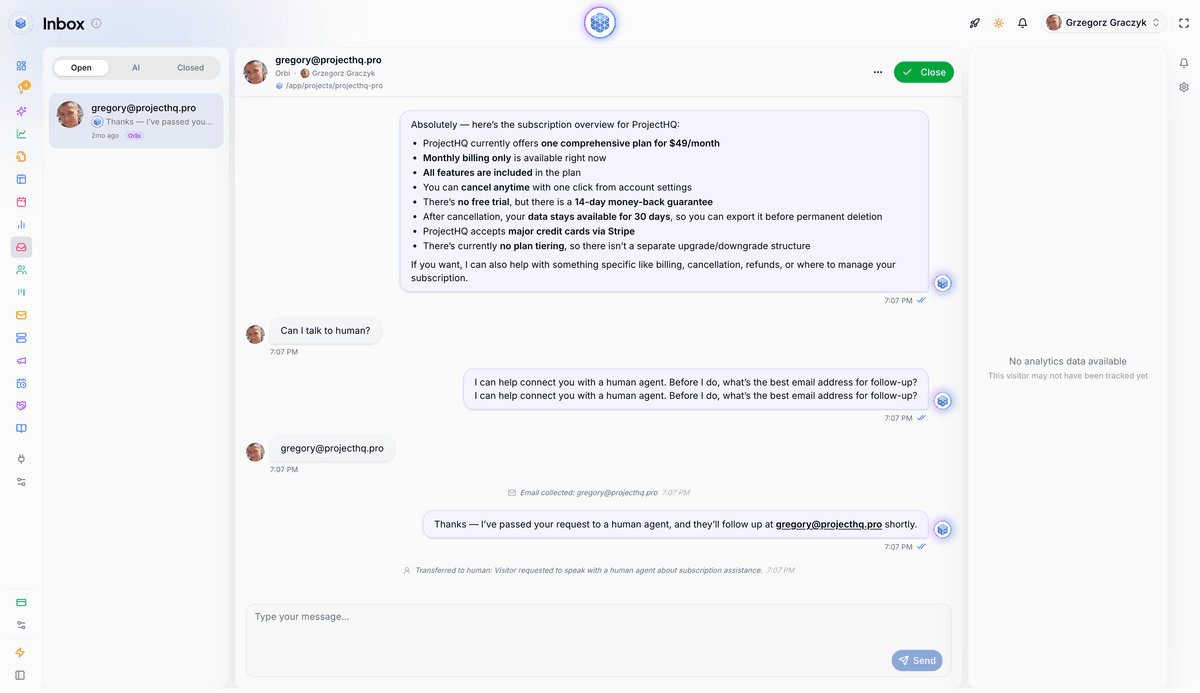
A knowledge base is not successful because it exists. It is successful when it changes behavior.
Track the right performance signals
Use a mix of support and website metrics to understand whether users are finding answers and moving forward. Useful indicators include:
Article views
Top internal search queries
Searches with no useful result
Repeated ticket themes
Chat escalations after article views
Visits to help content from pricing or product pages
Conversion rates on pages with embedded help content
Contentful highlights that knowledge-base usage data can reveal what customers are looking for and where gaps exist. Zendesk also points to analytics as part of ongoing improvement. Both are useful if your goal is to improve self-service rather than just publish more content.
Connect help content to page performance
Website analytics can reveal where support demand begins. If a pricing page generates lots of exits and lots of plan-related questions, the issue may not be support capacity. It may be missing clarity on the page.
That is where a tool like ProjectHQ’s website analytics can help. Its analytics feature tracks page views, traffic sources, and custom events, which can support a more practical review of where visitors struggle, what content they consume, and which pages deserve stronger in-context answers.
Review unresolved demand every month
As a simple operating rhythm, many teams review these questions monthly:
Which ticket topics are still repetitive?
Which help articles get traffic but do not prevent escalation?
Which site pages trigger questions but offer little guidance?
Which search terms suggest we are missing content entirely?
This turns the knowledge base into an iterative system instead of a static archive.
A simple implementation example
In practice, teams usually build an initial knowledge base from the questions they already see most often. A common pattern is to export a month of support tickets and chat transcripts, group them by theme, publish articles for the top recurring questions, then watch whether those topics generate fewer repeat conversations over the next review cycle.
That workflow aligns with how Atlassian frames knowledge bases as a way to help users find answers without opening a ticket and how Contentful describes self-service content as reducing the need to wait on support. It also matches the product setup described in ProjectHQ’s own pages: a knowledge base can centralize answers, chat can surface them in context, and analytics can help you review article visits, referral pages, and related on-site behavior.
What you should not do is assume deflection without checking. Look for directional changes in repeated ticket themes, article views before escalation, and the pages that most often send visitors into support. Those indicators give you a more credible before-and-after picture than publishing articles and declaring success.
For a more neutral framing beyond vendor product pages, both Atlassian and Contentful emphasize centralized knowledge, reuse, and self-service as the basis for this workflow, while Zendesk stresses iterative improvement rather than one-time publication.
Set an editorial workflow so the help center stays useful
Even a strong launch will decay if nobody owns the content after publication.
Assign clear ownership
Every article or category should have:
An owner
A last-reviewed date
A next-review date
A trigger for updates
Common triggers include product releases, policy changes, pricing updates, support spikes, and recurring search failures.
Keep the workflow lightweight
You do not need a heavy publishing bureaucracy. You do need a repeatable process:
Capture recurring questions.
Prioritize by impact.
Draft from a standard template.
Review for factual accuracy.
Publish and link contextually.
Measure and revise.
If your team produces content regularly, a planning system can help keep both marketing and support content organized. For example, ProjectHQ’s Content Planner is built for structured publishing workflows, which can help teams manage an editorial queue around high-priority support topics as well as search-driven content.
Use briefs for complex articles
Not every help article needs a formal brief, but complex topics often do. A short brief can define:
The user question being answered
The audience and context
The desired outcome
Known edge cases
Internal reviewers
Related articles to link
This prevents the common problem of publishing technically correct content that still does not answer the user’s real question.
A simple 30-day rollout plan
If you are starting from scratch, this four-week approach is enough to launch a useful first version without overcomplicating the project.
Week 1: audit your question sources
Collect recurring questions from support, sales, onboarding, and chat. Group them into themes, identify the top categories, and choose the first topics to publish.
Week 2: publish the first 10 to 20 articles
Focus on high-frequency, high-friction issues. Use a consistent template and keep each article tightly scoped. Aim for direct answers, not long explanations.
Week 3: place answers across your site
Link the new articles from pricing, feature, onboarding, and account pages. Add contextual FAQs where confusion is predictable. If relevant, connect the content to an AI support layer so users can retrieve answers without opening a full ticket.
Week 4: review data and assign long-term ownership
Check article traffic, unresolved questions, chat escalations, and repeated ticket topics. Then assign category owners, define review cadences, and create the next batch of articles based on evidence.
If you want a single system for the documentation layer, AI support layer, and measurement layer, ProjectHQ combines a knowledge base, AI-assisted live chat, and website analytics in one platform.
Final takeaway
The best way to reduce support tickets is not to hide your contact form or push users toward bots. It is to answer the right questions clearly, organize those answers well, and place them where people actually need them.
That is the real goal when learning how to build a website knowledge base. Start with repeated questions. Structure content for fast scanning. Publish article types that resolve real issues. Surface answers on pricing, product, and onboarding pages. Then use AI and analytics to make self-service faster and smarter over time.
If you do that consistently, your knowledge base can reduce avoidable support demand and make your website easier to buy from, easier to use, and easier to trust.
Grzegorz is the founder of ProjectHQ and has spent 15+ years in SEO — from technical audits to content strategy that ranks. He builds the product he writes about, so the playbooks here come from running real campaigns, not theory.
Ready to grow traffic?
Write SEO-optimized articles and track your rankings with ProjectHQ.
Get started