How to Prioritize Technical SEO Fixes With Limited Developer Time
 Grzegorz Graczyk7 min read
An audit export is evidence, not a roadmap
A 90-row audit can consume a week of discussion and still produce no decision. Scarce developer time goes further when you first isolate genuine emergencies, then compare the remaining work by business impact, reach, confidence, and implementation effort.
That distinction matters because audit tools report symptoms at scale. One faulty template may generate 4,000 URL-level warnings, while a broken link on your highest-converting page appears once. Raw issue counts flatten those differences.
If you’re working out how to prioritize technical SEO fixes with limited developer time, use this sequence: pull emergencies out of the backlog, collect enough evidence to compare the rest, place each item in the right work queue, and define validation before a ticket enters a sprint.
Pull true emergencies out of the scoring queue
Some problems shouldn’t wait for a scoring workshop. Treat an issue as an emergency when it is active, affects strategically important pages, and prevents search engines or users from accessing, interpreting, or reaching those pages as intended.
What qualifies for immediate containment?
The strongest candidates include accidental noindex directives, broad crawl blocks, template-level canonical defects, widespread 5xx responses, and failed redirects after a migration. Scope is critical. A 404 on an obsolete campaign URL is routine cleanup; 404s across the primary product navigation deserve immediate attention.
Canonical errors show why the emergency gate exists. Google describes redirects and rel="canonical" annotations as strong canonicalization signals. A shared template that points many unique pages at one URL can therefore create widespread indexing risk. Our guide to a sitewide canonical tag bug explains how to inspect the output, contain the fault, and verify recovery.
Confirm the mechanism before escalating
Test representative URLs from each affected page type. Check the HTTP status, raw HTML, rendered output, robots directives, canonical target, and redirect destination. Look for a release, migration, plugin update, or configuration change that matches the timing.
Keep crawl control and index control separate. Google’s robots.txt guidance says a disallowed URL can still appear in search results if Google discovers it elsewhere. If the goal is removal from search, robots.txt alone is the wrong remedy.
Build the smallest useful evidence sheet
Once emergencies are contained, turn the audit into a short list of root causes. Group findings by template, component, configuration rule, and likely owner. Don’t paste one row per affected URL into the engineering backlog.
For each root cause, capture:
The issue and the desired outcome
The affected template, component, or rule
Two or three representative URLs
The number of affected valuable pages
Traffic, conversion, ranking, or link evidence
Your root-cause hypothesis and confidence level
The likely owner and engineering estimate
Page value needs judgment. A support article, product page, and legal page have different jobs. Organic traffic and rankings help, but leads, revenue, customer journeys, backlinks, and strategic importance may carry more weight.
Technical condition also changes how you interpret performance. Before rewriting or removing a weak page, make sure it hasn’t been orphaned, miscanonicalized, or blocked. For pages that are technically accessible but still underperform, use a separate content audit decision process to choose between updating, consolidating, redirecting, or deleting.
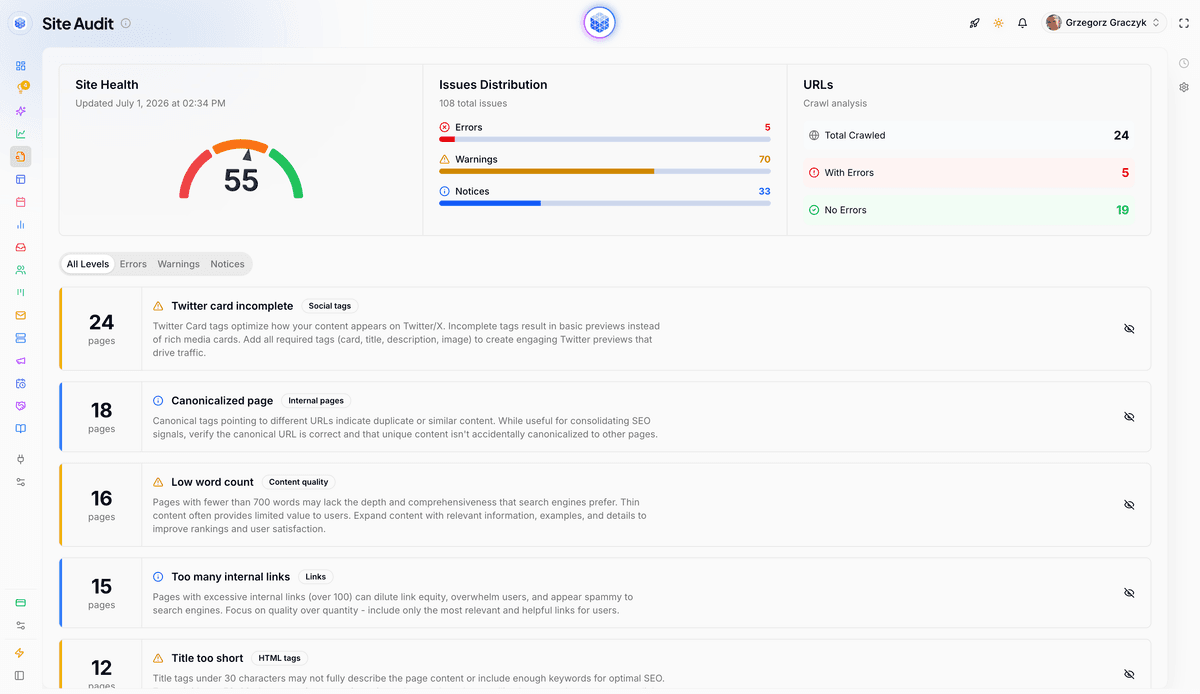
Our Site Audit crawls the site, classifies pages, groups findings by severity, supports ignore rules, and allows manual rescans. That supplies the technical inventory. You still add the commercial context and engineering constraints that determine the actual order of work.
Score impact, reach, confidence, and effort
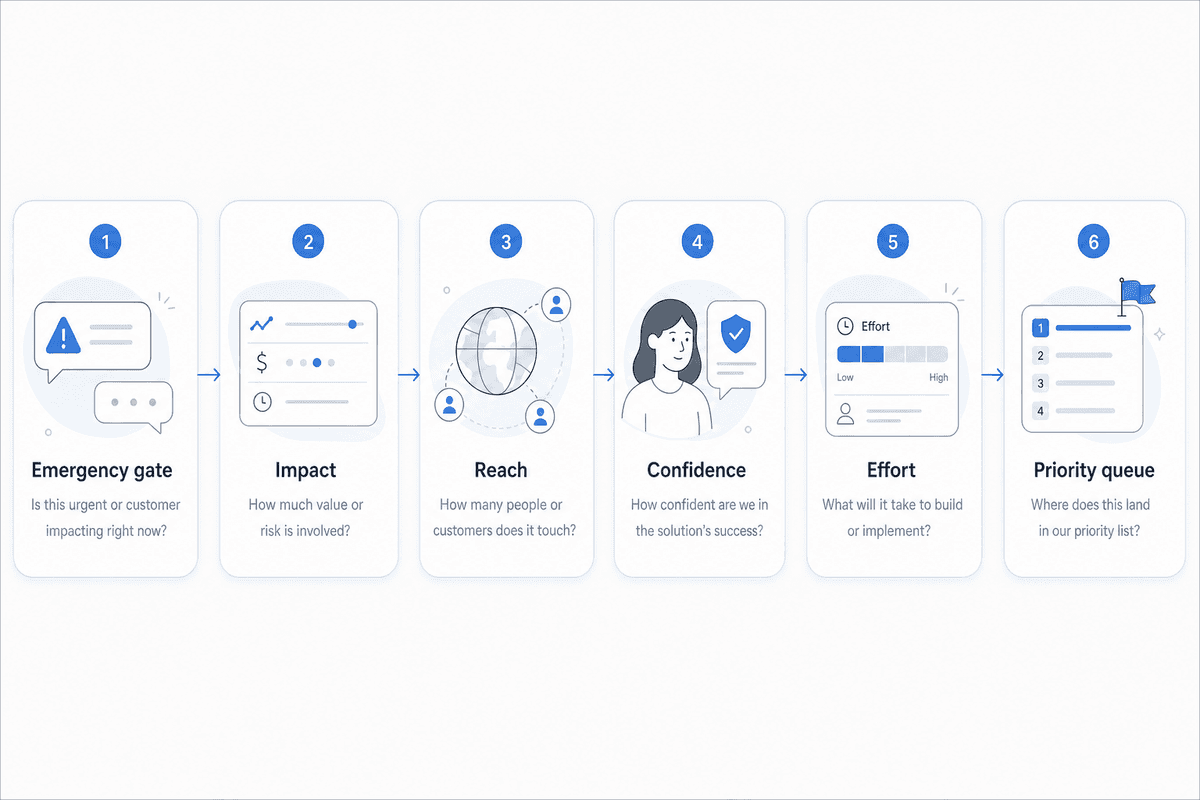
After removing emergencies, our lightweight working model makes competing requests easier to compare. It uses a 1–5 scale for four inputs. The exact formula is ours; its factor selection follows the broader risk, reward, and implementation-likelihood approach commonly used to prioritize technical SEO work.
Factor | 1 | 3 | 5 |
|---|---|---|---|
Impact | Little measurable value | Meaningful visibility or journey improvement | Major risk or gain on business-critical pages |
Reach | One low-value page | An important page group or template | Many high-value pages or most of the site |
Confidence | Untested hypothesis | Crawl evidence plus representative checks | Mechanism confirmed across data and direct inspection |
Effort | Localized, low-risk change | Shared component change with moderate QA | Architectural work, migration, or broad regression risk |
Calculate a working priority score:
Priority score = impact × reach × confidence ÷ effort
The number is a comparison aid, not a promise of traffic. It forces the team to expose its assumptions. Two people who disagree about priority can now discuss whether reach is overstated, evidence is weak, or effort is underestimated.
Let engineering score engineering effort
A marketer may see a one-line tag change. A developer may see a shared rendering component, CMS limitation, release dependency, and regression testing across six templates. Ask the person responsible for implementation to estimate effort before presenting the queue as final.
Then apply judgment for dependencies, reversibility, and timing. A medium-scoring fix may move up because the relevant component is already being changed. A higher score may wait if the proposed implementation creates unnecessary release risk.
A worked comparison
Finding | Impact | Reach | Confidence | Effort | Score | Decision |
|---|---|---|---|---|---|---|
Shared canonical points valuable pages to the homepage | — | — | — | — | Emergency | Contain and verify now |
Broken internal links on conversion pages | 4 | 3 | 5 | 2 | 30 | Schedule first |
Duplicate titles from a key category template | 3 | 4 | 4 | 2 | 24 | Batch by template |
Missing descriptions on isolated low-value posts | 2 | 2 | 3 | 2 | 6 | Marketer-owned where possible |
Cosmetic URL preference with working redirects | 1 | 3 | 2 | 4 | 1.5 | Accept or monitor |
Your values will differ. The useful part is the visible reasoning behind them.
Choose the right queue, not just the highest score
A ranked spreadsheet still fails if every item competes for the same engineering slot. Divide the work into four operational queues.
Contain now
Use this queue for active crawl, indexation, availability, or migration failures on important pages. Containment may mean rolling back a release, disabling faulty output, or restoring a previous rule while the permanent fix is prepared.
Batch into a sprint
Combine related fixes when they touch the same template or component. If a product template generates duplicate titles, broken breadcrumbs, and an incorrect canonical, batching lets developers address the related changes together and test the template as a unit.
Complete without engineering
Marketing may be able to update internal links, edit metadata, correct CMS fields, or adjust sitemap configuration when access and QA procedures are clear. Google’s sitemap overview explains that sitemaps help search engines discover important URLs, especially on larger or more complex sites, while good internal linking remains essential.
Accept or monitor
Some warnings reflect intentional behavior or carry too little value to justify the change. Document the decision, owner, and review trigger. In ProjectHQ, ignore rules can hide an accepted issue by type, page, or a specific combination so the team doesn’t debate it again after every crawl.
Write tickets that reduce engineering discovery time
“Fix canonical tags” isn’t a usable ticket. Neither is a crawler export with 2,000 rows. A developer-ready request explains the outcome, shows the pattern, and makes acceptance testable.
What a useful ticket contains
Business impact: Which valuable pages or user paths are affected?
Evidence: Include representative URLs, timing, and the observed pattern.
Root-cause hypothesis: Name the likely template, component, or rule without presenting a guess as certainty.
Expected behavior: State what the response, rendered page, directive, or redirect should do.
Acceptance criteria: Define checks for representative pages and nearby templates.
Validation and rollback: Say how production will be checked and when the change should be reversed.
SEO owns the desired search outcome. Engineering should be free to challenge the proposed implementation and effort estimate. That conversation often reveals a cheaper shared fix or a dependency the original audit couldn’t see.
Stakeholder reporting should preserve the same hierarchy. Show critical risk, completed work, decisions waiting on resources, and expected outcomes. Our guide to an SEO reporting dashboard that gets read explains how to keep raw crawl detail behind a concise decision layer.
Validation is part of the fix
A merged ticket isn’t a verified SEO fix. Test representative URLs in staging when possible, then check production responses, raw HTML, rendered output, directives, canonicals, links, and redirects after release.
Technical verification
Run a fresh crawl to confirm that the original pattern has cleared and adjacent templates haven’t regressed. ProjectHQ supports manual rescans for this purpose. For canonical or indexation incidents, also use Google’s indexed data; a clean crawl confirms current site output, while Google may need time to recrawl and reprocess affected URLs.
Outcome monitoring
Record the deployment date, affected page set, expected signal, and review date. Our SEO and Rank Tracking tools monitor keyword positions, historical trends, competitor movement, and SERP features, which helps teams watch priority keyword groups after a release. Rankings can move for many reasons, so evaluate the technical checks first and interpret visibility trends in context.
Compare the result with the original estimate. If a supposedly easy fix required broad QA, update future effort scoring. If a high-confidence change cleared the technical issue without affecting the expected pages, revisit the impact assumptions rather than inventing a success story.
Use the next developer hour deliberately
Before requesting another sprint slot, isolate any active emergency and choose one shared fix with meaningful business impact. Ask engineering to confirm the effort, write acceptance criteria, and agree on the post-release check.
That produces a smaller backlog with stronger evidence and fewer speculative requests. It also gives founders and marketers a defensible answer when engineering asks why this technical SEO task deserves time ahead of everything else.
Grzegorz is the founder of ProjectHQ and has spent 15+ years in SEO — from technical audits to content strategy that ranks. He builds the product he writes about, so the playbooks here come from running real campaigns, not theory.
Ready to grow traffic?
Write SEO-optimized articles and track your rankings with ProjectHQ.
Get started