How a Single Canonical Tag Bug Can Deindex Your Entire Site
 Grzegorz Graczyk12 min read
A canonical tag is one line of markup, but when that line comes from a shared template, it can create widespread indexing risk across every page that uses the template.
The same failure can happen anywhere. A hardcoded value, missing path variable, plugin regression, leaked environment setting, or JavaScript mutation can make thousands of URLs declare the same canonical. If Google accepts that declaration and groups those pages as duplicates, it will generally index the selected canonical while excluding alternate URLs.
That does not mean rel="canonical" is a guaranteed deindexing command. Google describes it as a strong canonicalization signal, not a directive that mechanically erases every URL. Google may ignore an implausible declaration. But when the wrong canonical is accepted—especially when other signals support it—the resulting exclusions can make large parts of a site disappear from search.
The recovery objective is straightforward: confirm that canonicalization is actually responsible, stop the faulty output, align every supporting signal, and monitor Google as it recrawls and reprocesses the affected URLs.
How a canonical bug can create widespread exclusions
Declared versus selected canonicals
The user-declared canonical is the URL your site identifies as preferred, usually through a rel="canonical" element in the HTML head or a Link HTTP response header. The Google-selected canonical is the representative URL Google ultimately chooses for a set of duplicate or substantially similar pages. These two values can differ.
A typical failure starts in a shared head component or base-URL setting. Instead of combining the production origin with each page’s path, the generator outputs one fixed URL. Every page using that component repeats the error. Google crawls those declarations, clusters URLs it considers duplicates, selects a representative, and may exclude the alternates. As indexed pages decline, impressions and organic visits can follow.
Why the outcome varies
Templating creates the scale, but it does not guarantee the outcome. Google can reject a nonsensical canonical, particularly when the pages are clearly different. Conversely, the wrong preference becomes more persuasive when redirects, sitemap entries, internal links, protocol or host choices, and similar content all reinforce it. Google notes that canonicalization methods can stack: redirects and canonical annotations are strong signals, while sitemap inclusion is weaker.
Canonicalization must also be distinguished from noindex. A canonical asks Google to choose a representative among related URLs. A noindex rule tells Google to drop a crawled page from search results. A canonical incident can produce widespread exclusion, but it works through clustering and selection rather than a direct indexing prohibition.
What our internal anecdote can—and cannot—show
We used a whole-site crawl in ProjectHQ Site Audit to collect pages for review, then inspected representative URLs to compare canonical output and identify repetition. Our Site Audit crawls an entire site, groups findings by severity, prioritizes issues, and supports manual rescans. For this investigation, we paired that crawl coverage with direct inspection rather than relying on dedicated checks for canonical extraction, duplicate-target grouping, host validation, or HTML/header conflicts.
The tools had different jobs. We used our crawl to scope the technical pattern, while Google Search Console’s URL Inspection data was still necessary to compare user-declared canonicals with Google-selected canonicals and assess what Google had done in its index. Manual spot checks alone could easily have missed the regression: a correct homepage or one healthy page says nothing about deeper templates.
That experience defines the response playbook: crawl broadly, verify against Google’s indexed data, fix the generator rather than individual pages, and rescan after deployment.
Recognize the canonical failure pattern
Correlate the decline with a change
Start with timing. Did an indexed-page decline or visibility loss follow a release, migration, CMS or plugin update, CDN rule, or environment configuration change? Focus on changes capable of modifying head markup, HTTP headers, redirects, hostnames, or rendered JavaScript.
Then review Search Console’s Page indexing report. A sharp increase in duplicate or alternate exclusions can support the hypothesis. However, “not indexed” is not automatically bad: duplicate parameter URLs and intentionally consolidated variants often belong outside the index. Look for a change affecting URLs that should be unique and searchable.
Compare representative URLs
Use URL Inspection on examples from different page types. In the indexed result, compare the user-declared canonical with the Google-selected canonical. The live test can show whether a current page may be indexable and what Google’s test renderer sees, but it cannot predict Google’s eventual canonical selection. Google’s URL Inspection documentation says the Google-selected canonical is available only in indexed data, not the live test.
Look for clustering by template, directory, locale, protocol, hostname, or rendering mode. If every article is affected but product pages are healthy, the article layout is a stronger lead than a domain-wide theory.
Rule out look-alikes
Do not attribute every index loss to canonicals. Check for robots.txt restrictions, meta robots or X-Robots-Tag: noindex, redirects, 4xx and 5xx responses, poor discovery, security incidents, and ordinary ranking volatility. A page can also remain indexed while losing rankings, which is a different diagnosis from exclusion.
The first 30 minutes: confirm scope and stop the damage
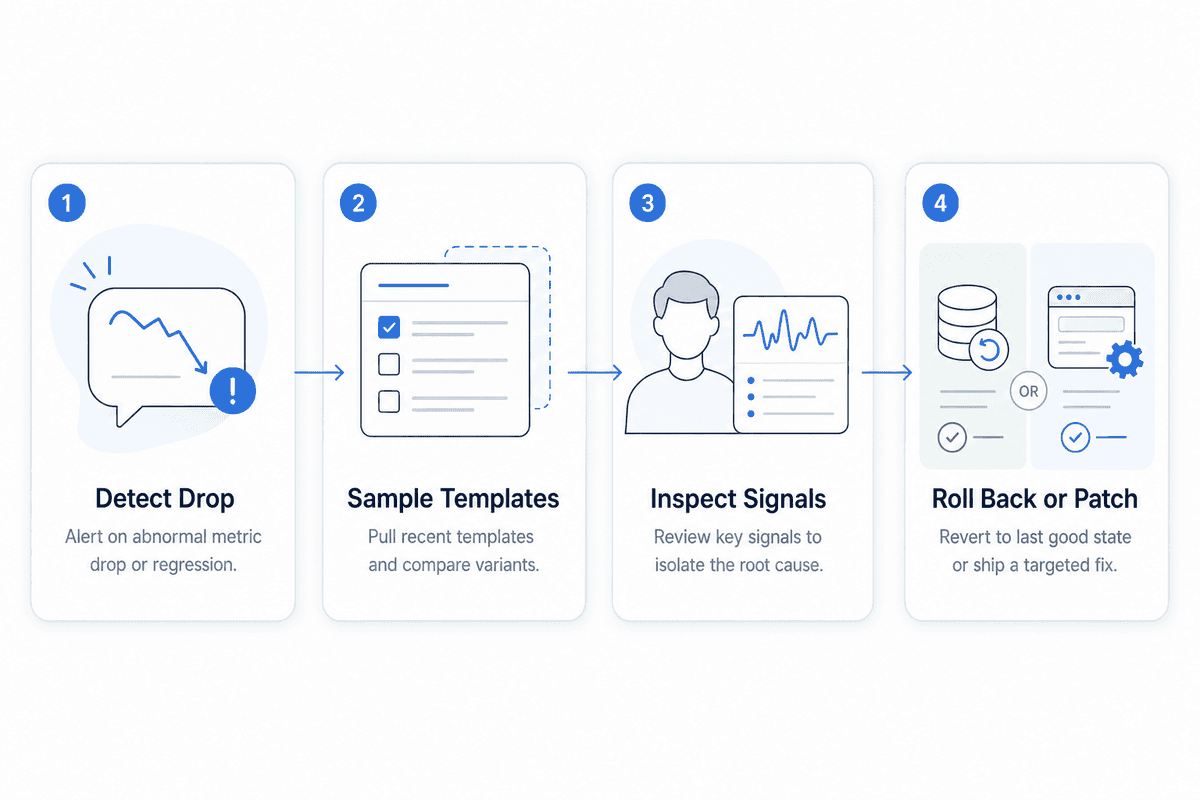
Freeze unrelated SEO changes. Preserve a clean timeline and identify the latest deployment or configuration change that could affect markup or headers.
Build a stratified sample. Include the homepage, category, product or service page, article, pagination, parameterized URL, locale, and at least one affected high-value URL. Do not test only the homepage.
Inspect three layers. Check raw HTML source, rendered DOM, and HTTP response headers. Server output, browser-rendered output, and header declarations can disagree.
Record the essentials. Capture the declared canonical, HTTP status, robots directives, redirect destination, and whether the canonical target is reachable and indexable.
Rollback when evidence is clear. If a recent release plainly introduced the bug, disable the faulty output or roll back before spending hours on secondary analysis.
Preserve evidence. Save affected samples, timestamps, deployment IDs, exports, and relevant captures so the root cause can still be verified after rollback.
The priority is containment. A fast rollback does not eliminate the need for investigation, but it prevents additional crawls from encountering the same bad signal.
Trace the canonical from your code to Google’s index
Inspect every declaration layer
In raw HTML, confirm that the intended canonical appears exactly once in a valid <head>. Next, inspect HTTP response headers. Non-HTML files can use a Link header, but HTML and header declarations can conflict when both are present.
Compare source with the rendered DOM. Client-side code may insert a canonical, overwrite the server value, or generate a path from incomplete route data. Google recommends clear, stable canonical information and advises against using JavaScript to inject or change canonical tags; if JavaScript is unavoidable, Google says the canonical should be set clearly and consistently.
Validate the target
Follow the target through every redirect. Its final URL should return a successful response, permit crawling, remain free of noindex, and contain the same or substantially similar content. Pointing a unique service page at an unrelated homepage is not legitimate duplicate consolidation.
Compare the canonical with all surrounding signals: sitemap entries, internal links, HTTP versus HTTPS, www versus non-www, redirects, hreflang annotations, and mobile alternates. Consistency helps Google understand the intended representative; contradictions force it to resolve competing evidence.
Close the loop in Search Console
Finally, inspect indexed data in Search Console to compare your declaration with Google’s selection. Repeat the process across several URLs from every affected template. A correct homepage cannot validate article, product, pagination, or locale routes.
The sitewide canonical bugs that cause the most damage
The following patterns range from minor inconsistencies to indexing emergencies. Search the table for a host, template, header, JavaScript, pagination, or locale issue that matches your symptoms.
Bug pattern | What appears in output | Why it is dangerous | Fastest verification |
|---|---|---|---|
Hardcoded homepage | Every page points to | Unique pages may be grouped under the homepage. | Crawl canonicals and group by target. |
Missing path variable | Origin is correct, but the route is absent or constant. | A shared helper collapses many templates to one URL. | Compare source across route types. |
Staging or preview leakage | Canonicals use a test or preview hostname. | Production declares another environment as preferred. | Search crawl exports for unapproved hosts. |
Copied cross-domain canonical | Pages point to another domain. | Google may consolidate signals away from your site. | Extract and group canonical hostnames. |
Unexpected relative resolution | A relative value resolves against an unintended base URL. | Routes, proxies, or a | Resolve the value from the fetched page URL. |
Protocol or host mismatch | HTTPS points to HTTP, or www and non-www disagree. | It creates duplicate preferences and redirect chains. | Compare canonical target with final URL. |
HTML/header conflict | Markup and | Google receives competing strong signals. | Inspect source and response headers together. |
JavaScript overwrite | Rendered canonical differs from server HTML. | The crawler may process unstable or contradictory values. | Diff raw source and rendered DOM. |
Malformed head placement | The canonical is duplicated or appears outside a valid head. | The annotation may be ignored or interpreted unpredictably. | Validate parsed HTML and DOM placement. |
CMS or plugin regression | A new version changes targets across its managed templates. | One update propagates immediately at scale. | Compare pre- and post-release crawls. |
Pagination collapsed | Page 2 and beyond point to page 1. | Distinct paginated URLs may lose their own representation. | Inspect several pages in each sequence. |
Wrong locale target | Localized pages point to another language URL. | Language variants can be consolidated incorrectly. | Compare canonical and |
Hacked canonical injection | Unknown cross-domain canonicals appear in source or rendering. | An attacker can redirect canonical signals off-site. | Compare files, rendered output, and security logs. |
Severity depends on reach and destination. A trailing-slash disagreement may create avoidable duplication; every page pointing to a foreign domain is an emergency. Hacking is less common than configuration failure, but unexplained cross-domain output warrants immediate security investigation.
Fix the implementation without creating a second incident
Generate the right URL
For a unique, indexable page, emit a stable self-referential canonical. For a true duplicate, point to the intended representative. Follow Google’s implementation guidance by using an absolute URL and placing the rel="canonical" element in a valid HTML <head>; use the HTTP Link header where appropriate for non-HTML resources.
A hardcoded implementation might look like this:
<link rel="canonical" href="https://example.com/">A correctly generated implementation combines an approved production origin with the page’s normalized canonical path:
<link rel="canonical" href="https://example.com/products/blue-widget">In application code, the path must be generated from validated route data—not copied from the browser indiscriminately, where tracking parameters, preview hosts, or untrusted input can leak into the tag.
Prefer absence to a blanket guess
If the generator cannot produce reliable values, temporarily removing the annotation is often safer than replacing it with one guessed canonical across the site. Google can select a canonical without an explicit declaration. A wrong strong signal creates more risk than no declaration.
Do not use robots.txt, Search Console’s removals tool, or noindex as substitutes for canonicalization. Robots.txt controls crawling, removals are temporary visibility controls, and noindex removes a crawled URL rather than consolidating duplicates.
Align and purge
Patch the shared generator, not thousands of individual pages. Align redirects, internal links, sitemaps, hreflang, and canonical tags around the same preferred URLs. Then purge application, CMS, edge, and CDN caches; otherwise stale markup can continue serving the bug after the source has been repaired.
Prove the fix before deploying it sitewide
Create a test matrix spanning content types and edge cases: paginated pages, query parameters, locales, mobile variants, HTTP and HTTPS, www and non-www, plus canonical and noncanonical duplicates. For each case, verify:
Raw and rendered HTML
HTTP response headers
Status codes and final redirect destinations
Robots directives
Sitemap membership
Internal-link destinations
Expected canonical mapping
Crawl staging or a controlled production sample, but ensure staging itself cannot leak into production canonicals. Add automated assertions allowing no more than one canonical, requiring an approved host and absolute HTTPS URL, validating expected path mapping, rejecting preview domains, and detecting HTML/header conflicts.
Where infrastructure permits, deploy gradually. Recrawl immediately and compare the new output with a known-good baseline. A browser check of three pages is not a release test for code that can touch every URL.
Help Google recrawl and recanonicalize the site
Send coherent discovery signals
Publish a clean sitemap containing the fully qualified canonical URLs you want indexed, then resubmit it in Search Console. Google describes sitemap inclusion as a weaker canonicalization signal, not a guarantee; its sitemap guidance explains supported formats and submission practices. Link internally to the same canonical URLs rather than routing users and crawlers through variants.
Use URL Inspection’s Request indexing feature selectively for the homepage, high-value pages, and representative URLs from affected templates. Google notes that Request Indexing is subject to quotas, so repeatedly submitting every URL is not an effective recovery strategy. Where the Page indexing report offers fix validation, use it and monitor the affected reason groups.
Allow time for reprocessing
Recovery depends on recrawling and reevaluation. Google’s canonicalization troubleshooting guidance says pages can remain in a duplicate cluster for up to two weeks after content issues are fixed. That is context, not a restoration promise: crawl frequency, site scale, content similarity, and signal consistency all affect progress.
Removing the visible tag is not enough if a CDN still serves stale HTML, an HTTP header repeats the old target, redirects conflict, or sitemaps continue listing the wrong URLs. Recovery begins only when Google can fetch consistently corrected signals.
Monitor recovery—and know when canonicalization is not the whole story
Separate deployment health from Google recovery
Track technical and search outcomes on separate timelines. Technical checks should show that bad output is gone immediately after cache purges. Search Console’s indexed data, impressions, clicks, organic sessions, and rankings will change later as Google recrawls and reprocesses pages.
Monitor indexed canonical counts, duplicate and alternate exclusion reasons, Google-selected canonical samples, and last crawl dates. Pair those with visibility metrics. Our ProjectHQ Rank Tracker can monitor keyword positions and historical trends after the fix, while Search Console remains the source for Google’s indexed canonical decisions.
Use our ProjectHQ Site Audit for repeat crawls, prioritized technical issue review, and manual rescans. Our crawler can verify what the site serves and reveal patterns at scale; it cannot disclose Google’s final canonical selection.
Define milestones and escalation points
Useful recovery milestones are:
Faulty canonical output is eliminated across every affected template.
Key URLs show fresh crawl dates.
Google-selected canonicals begin matching intended URLs.
Indexed-page counts and exclusion groups stabilize.
Impressions, rankings, and organic visits begin returning.
If technically correct signals persist but pages remain absent, broaden the investigation. Check noindex, crawl access, response failures, manual actions, security problems, discovery and internal linking, and substantial duplication or quality issues. Canonicalization may have been one cause without being the only cause.
Make canonical regressions hard to ship
Assign ownership and tests
Canonical logic crosses SEO, engineering, platform, and release management, so assign an accountable owner and document who approves changes. Add checks to unit tests, integration tests, crawl-based QA, and post-deployment smoke tests.
Alert on approved-host violations, mass convergence toward one canonical, sudden changes in the number of unique canonical targets, and staging-domain references. These are high-signal conditions that can reveal a regression before search visibility falls.
Treat template changes like infrastructure changes
Migration and template-change checklists should cover canonicals, redirects, sitemaps, internal links, hreflang, robots directives, and cache behavior as one connected system. Schedule whole-site audits rather than relying on occasional manual checks. ProjectHQ’s Site Audit can crawl the site, prioritize technical findings, and support manual rescans after fixes.
A canonical tag may look like metadata, but shared canonical code behaves like infrastructure-level routing. Treat it with the same caution as redirects and robots directives: test representative edge cases, monitor the entire output surface, and never assume that one healthy URL proves the site is safe.
Grzegorz is the founder of ProjectHQ and has spent 15+ years in SEO — from technical audits to content strategy that ranks. He builds the product he writes about, so the playbooks here come from running real campaigns, not theory.
Ready to grow traffic?
Write SEO-optimized articles and track your rankings with ProjectHQ.
Get started