What Are SEO Keywords? A Complete Guide to Finding and Using Them
 Grzegorz Graczyk11 min read
A spreadsheet of 300 search phrases won't tell you which page to write on Monday. A useful keyword plan will: it connects each search to a customer need, assigns it to a page, and gives your team a publishing order.
That's the practical payoff of understanding SEO keywords. We'll follow Ledgerly, a hypothetical invoicing app for freelancers, from its first seed phrases through research, clustering, publishing, and rank tracking. The goal is a short, ordered content plan in which every page has a clear job.
What Are SEO Keywords?
SEO keywords are the words and phrases people enter into search engines. For your website, they're the searches you want a particular page to appear for. “Freelance invoice template” is a keyword; so is the full question “How do I invoice my first client?”
SISTRIX describes keywords as the interface between user intent, website content, and ranking factors. They connect what someone needs with the page that helps them.
A keyword and a query are slightly different
A query is what a person actually types. A keyword is the phrase you use to organize your research and page planning. Someone might search “invoice template freelance designer free,” while Ledgerly plans around “freelance invoice template.”
The distinction also explains why variations such as “what are SEO keywords” and “what is SEO keywords” don't need separate articles. The wording differs; the underlying question is the same.
Meaning matters more than repetition
Early search optimization placed much more emphasis on keyword frequency. Google's evolution, including Panda in 2011, Hummingbird in 2013, RankBrain in 2015, and BERT in 2019, increased the importance of content quality and understanding language and intent.
Google's SEO Starter Guide recommends anticipating the words readers use, illustrating the point with “charcuterie” and “cheese board.” It also explains that its language-matching systems understand relationships between searches and pages; you don't need to include every possible variation.
Treat a keyword as a promise about what the page delivers. Ledgerly's template page must provide a usable template, with enough guidance to help someone complete it.
The Keyword Types That Actually Matter for Planning
Keyword labels help you make decisions, but they describe different dimensions. A phrase can be long-tail, unbranded, and a page's primary keyword at the same time.
Type | What it signals | Ledgerly example | Typical page |
|---|---|---|---|
Short-tail or head | A broad topic, often with strong competition | invoicing software | Product or category page |
Long-tail | A narrower need with clearer context | how to invoice a client for the first time as a freelancer | Step-by-step guide |
Branded | Interest in a named business or product | Ledgerly pricing | Pricing page |
Unbranded | Interest in a problem or solution without a named vendor | freelance invoice template | Template resource |
Primary | The main search a page is planned around | how to write an invoice | Instructional guide |
Secondary | A close variant or supporting question | what to include on an invoice | Section within that guide |
Seed | A starting point for discovering more specific searches | freelance billing | No page assigned yet |
Long-tail keywords often attract fewer searches individually and face less competition, but specificity alone doesn't make a keyword easy. For planning, choose one primary keyword per page and use secondary keywords to identify the related details that page should cover.
Step 1: Start With Search Intent, Not Volume

What does the searcher want to accomplish?
Search intent is the task behind the words. Four categories provide a useful starting point:
Informational: Someone wants an explanation or instructions. “How to write an invoice” belongs here; “how” and “what” are common clues.
Navigational: Someone wants a specific destination. “Ledgerly login” should lead to the login page.
Commercial: Someone is evaluating options. “Best invoicing software for freelancers” suggests a comparison; “review” and “vs” often indicate the same behavior.
Transactional: Someone wants to take action. “Ledgerly pricing” suggests purchase consideration; “buy” and “sign up” are other clues.
These categories overlap. A pricing search might involve both evaluation and purchase intent. Use the labels to choose a helpful page format rather than arguing over the perfect classification.
Check the results before choosing a format
Search the phrase in your target market and inspect the leading organic results. Are they tutorials, comparison lists, or product pages? Open a few and look at what they actually deliver.
If the results for Ledgerly's chosen phrase are dominated by comparison articles, a bare product page is unlikely to meet the same expectation. Mixed results suggest multiple interpretations, so a more specific phrase might offer a clearer starting point.
Intent determines the format before drafting begins. To connect that decision with what buyers need next, use our guide to mapping SaaS content to customer journey stages.
Step 2: Build Your Keyword List
Expand a handful of seeds
Start with three to five phrases drawn from your product and your customers' problems. Ledgerly's starting list is “invoice,” “freelance billing,” “late payments,” and “invoice template.”
Enter each into Google and collect relevant autocomplete suggestions. Check People Also Ask and Related Searches when they appear. Google Keyword Planner offers another source of ideas and estimated demand, although its data is designed for advertising research.
Record the exact phrase and where you found it. Collect broadly at this stage, as Keyword.com's guide to keyword types recommends. Filtering every suggestion immediately makes it easy to miss useful directions.
Include the language customers already use
On-site search, support conversations, and sales calls reveal needs that keyword tools don't always surface clearly. For Ledgerly, a question such as “What should I say when an invoice is overdue?” could lead to research around payment reminder emails.
Our guide to using internal search data for SEO content planning explains how to turn those searches into research inputs. You can also turn website visitor questions into blog post ideas when the same problem keeps appearing.
These are evidence of customer needs. Validate broader search demand separately; one support question doesn't establish monthly search volume.
Step 3: Qualify Keywords With Volume, Difficulty, and Fit
Read the metrics in context
Search volume estimates how often a phrase is searched, usually per month in a selected location. For a US-focused campaign, use United States data consistently. Volume measures searches rather than guaranteed visitors.
Keyword difficulty estimates the competition involved in reaching prominent results. Keyword.com describes scores roughly below 30 as low difficulty. Treat that as a rough filter within a tool: providers calculate difficulty differently, so a 26 in one platform isn't necessarily equivalent to a 26 elsewhere.
Inspect the results yourself. A highly specific phrase can still be dominated by established competitors with excellent pages.
Make business fit the deciding filter
Ask: would someone making this search plausibly need Ledgerly? “Freelance invoice template” has a clear connection. A search about invoice-processing careers has a much weaker connection, even if its metrics look appealing.
SISTRIX makes the useful point that software can't make the final keyword selection for you. Your team's knowledge of the buyer still matters.
Give each candidate one of three decisions:
Keep: Relevant to the buyer, clear enough to serve well, and feasible enough to prioritize.
Park: Relevant, but too competitive or dependent on resources you don't have yet.
Drop: Poor business fit or an intent your site cannot satisfy.
Ledgerly might keep the template cluster and park the broader “invoicing software” target for later investment. Adding keyword-volume estimates doesn't establish the size of a unique audience or forecast how many visits a page will receive.
Step 4: Cluster Keywords Into Topics

Group searches a single page can satisfy
Keyword clustering means grouping searches that share a need and can be served by one page. Similar wording helps, but shared intent and search results provide better evidence.
Consider these Ledgerly candidates:
freelance invoice template
invoice template for freelancers
free freelancer invoice template
If the leading results substantially overlap, these belong in one cluster. The “free” variation also sets a requirement: the resource must actually be available free to satisfy that search.
Use search-result overlap as a practical test
Compare the first page of organic results for two phrases in the same country. When mostly the same URLs appear and solve the same task, one page is usually a sensible starting point. There's no universal overlap threshold that replaces judgment.
“How to write an invoice” deserves a separate cluster when its results favor instructional guides. That searcher needs a process; the template searcher primarily needs an asset.
These clusters can sit within a broader freelance invoicing topic, with supporting pages connected to a central guide. Our guide to building topic clusters for a small business website explains that wider structure.
Step 5: Pick One Page per Cluster
Choose the destination before adding another URL
Use one cluster, one intended URL, one primary keyword as your planning rule. This organizes your site's targeting; it doesn't mean Google will rank a page for only one phrase.
Audit existing pages first. If Ledgerly already has a useful template page, improve it instead of publishing a near-duplicate blog post. Create a new page when the cluster represents a distinct task that existing content doesn't cover.
Ledgerly's first content plan
The following plan is illustrative. The paths are hypothetical, and the priorities reflect intent and business fit rather than measured search data. Assume Ledgerly already has a basic template resource and pricing page.
Cluster | Primary keyword | Intent | Page type | New or existing URL | Priority |
|---|---|---|---|---|---|
Freelancer templates | freelance invoice template | Resource-seeking | Template resource | Update: /templates/freelance-invoice | 1 |
First invoice instructions | how to write an invoice | Informational | Step-by-step guide | New: /blog/how-to-write-an-invoice | 2 |
Overdue invoice messages | payment reminder email | Informational | Guide with examples | New: /blog/payment-reminder-email | 3 |
Freelancer software choices | best invoicing software for freelancers | Commercial | Comparison guide | New: /blog/invoicing-software-for-freelancers | 4 |
Ledgerly purchase information | Ledgerly pricing | Transactional | Pricing page | Maintain: /pricing | Ongoing |
Pricing remains essential even if branded search demand is initially small. The comparison page comes later because it requires credible evaluation and ongoing maintenance.
Check for competing pages
Two pages serving the same cluster can split attention and make the preferred destination unclear. Multiple ranking URLs aren't automatically a problem, but repeated switching between similar pages warrants investigation. Follow our guide to finding keyword cannibalization in Google Search Console when that happens.
Google's Starter Guide also recommends managing duplicate content and choosing canonical URLs. Canonicalization addresses duplicate or very similar URL versions; distinct pages with overlapping purposes need an editorial decision about whether to merge or differentiate them.
Step 6: Publish Pages That Use Keywords Naturally
Make the page's subject clear
Use the primary phrase, or a natural close variation, in the page title and main heading. Choose a descriptive URL, explain the task in the introduction, and use subheadings that reflect the questions readers need answered.
For Ledgerly's guide, useful sections would cover required invoice details, a completed example, and how to send the invoice. Those sections naturally accommodate secondary searches without repeating the primary phrase in every paragraph.
Write image alt text to describe the image's purpose and content. Include a keyword only when it genuinely fits that description. Internal link text should also describe its destination: “download the freelance invoice template” tells readers more than “click here.”
Deliver the answer, then review the draft
Google's Starter Guide emphasizes useful, compelling, original content. Keyword placement supports that work; there's no keyword-density target you need to hit. A template page needs the promised resource, and a comparison needs meaningful criteria and accurate product details.
Our AI Content Creation wizard researches keywords and search volumes, analyzes top-ranking competitors, builds a structured outline, and scores the draft for SEO. That keeps research and writing in one workflow.
Human review still matters. Check examples, verify factual claims, and make sure the page fulfills its promise before publishing. Our AI content fact-checking checklist provides a practical review process.
Finally, connect each supporting page to the broader invoicing guide and to closely related resources where useful. Ledgerly's first-invoice guide should link directly to the template someone can use to follow its instructions.
Step 7: Track Rankings and Iterate
Measure the page and its keyword cluster
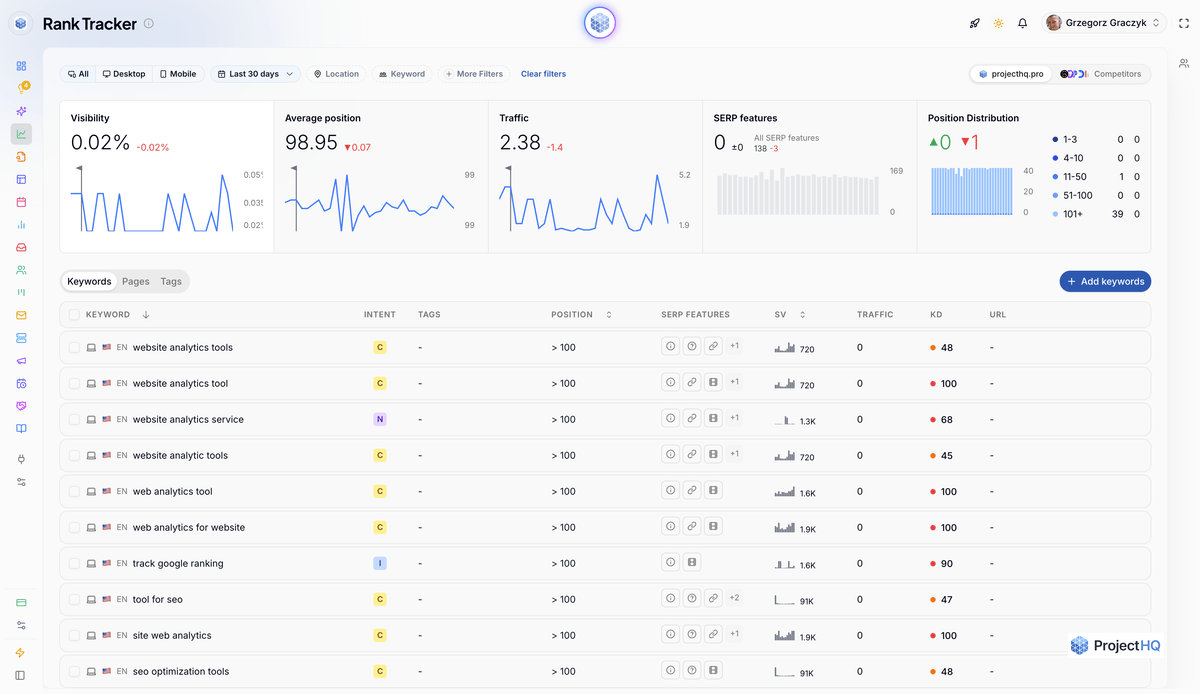
Track the primary keyword and a few meaningful variants for each URL. For Ledgerly's template resource, that means monitoring the freelancer-template cluster together rather than celebrating one phrase while overlooking the rest.
Google says changes can take anywhere from hours to several months to show an effect, and recommends waiting a few weeks to assess whether improvements helped. Confirm that a page is accessible and indexed, then give it time before rewriting it based on daily fluctuations.
Our guide to tracking rankings by landing page explains how to connect keyword movement to the URL intended to earn those visits.
Turn patterns into specific changes
A page approaching page one deserves a closer look: improve an incomplete answer, refresh an outdated example, or add relevant internal links. If it starts appearing for an unexpected query, check whether that query fits the page's purpose. Add a section when it does; research a separate cluster when it requires a substantially different answer.
If two similar URLs repeatedly swap positions for the same searches, investigate overlap before expanding either page.
Our SEO & Rank Tracking monitors positions automatically, with trend analysis, competitor tracking, and AI-powered recommendations. Volume, difficulty, and intent are available alongside the rankings, in the same platform where your team creates its content.
Common Beginner Mistakes With SEO Keywords
Before approving the plan, check these five failure points:
Prioritizing a broad head term because it has the largest volume, despite stronger competitors and an unclear route to attracting customers.
Assigning separate posts to close keyword variants that belong on one page.
Choosing a page format before inspecting search intent, such as sending an instructional query to a sales page.
Forcing repeated exact-match phrases into otherwise readable copy.
Leaving published pages untouched as examples, product details, and search results change.
For Ledgerly, the approval check is concrete: does every proposed page have a distinct reader task, an intended URL, and someone responsible for reviewing its performance? Missing answers identify work to finish before commissioning another draft.
From Keyword List to Content Plan
Ledgerly's four seeds have become a manageable publishing queue: improve the template, explain the first invoice, help with payment reminders, then tackle software comparisons. Close variants sit together, and pricing has its own established destination.
Keep that plan live. Add a cluster when research reveals a distinct need, and revise priorities when rankings and customer questions show where more work is worthwhile. Assign the first page to an owner and set its review date before moving on to the next.
If your team wants fewer handoffs between subscriptions, use ProjectHQ to research keywords, create content, and track rankings in one place. Start with one well-defined cluster and its intended page; you'll have a clear piece of work to publish and a clear result to monitor.
Grzegorz is the founder of ProjectHQ and has spent 15+ years in SEO — from technical audits to content strategy that ranks. He builds the product he writes about, so the playbooks here come from running real campaigns, not theory.
Ready to grow traffic?
Write SEO-optimized articles and track your rankings with ProjectHQ.
Get started