How to Improve Organic CTR Without Ranking Higher
 Grzegorz Graczyk11 min read
If a page is already earning impressions in Google, you do not always need a higher ranking to get more traffic. Sometimes you just need more people to choose your result.
That is the real opportunity behind organic click-through rate, or CTR. In Google Search Console, CTR is simply clicks divided by impressions. When impressions are steady and rankings are relatively stable, a low CTR often means your search snippet is not winning the decision moment on the results page.
This is good news because snippet-level improvements are often one of the faster wins on pages that already earn visibility, especially when impressions are steady and position is relatively stable. If you identify the right pages and make smart changes to titles, meta descriptions, and intent alignment, you can often earn more clicks without waiting for rankings to change.
Here is a practical playbook for how to improve organic CTR on pages that are already visible but underperforming.
Why CTR is the fastest traffic win you can make
Google’s Performance reports show four core metrics together: clicks, impressions, CTR, and average position. That matters because CTR should never be judged in isolation. A page at position 2 and a page at position 9 should not be expected to earn the same click rate. Google documents these metrics and how they are counted in Search Console’s Performance report overview and its definitions for impressions, clicks, CTR, and position.
But when a page has meaningful impressions and its position is not moving much, improving CTR can translate directly into more traffic. For example, if a URL earns 10,000 impressions a month and its CTR rises from 2% to 3%, that is 100 additional clicks without any ranking gain.
The caveat: do not chase clicks that come from misleading copy. The goal is not to write bait. The goal is to make your result look like the best match for the search.
Find the right pages to optimize first
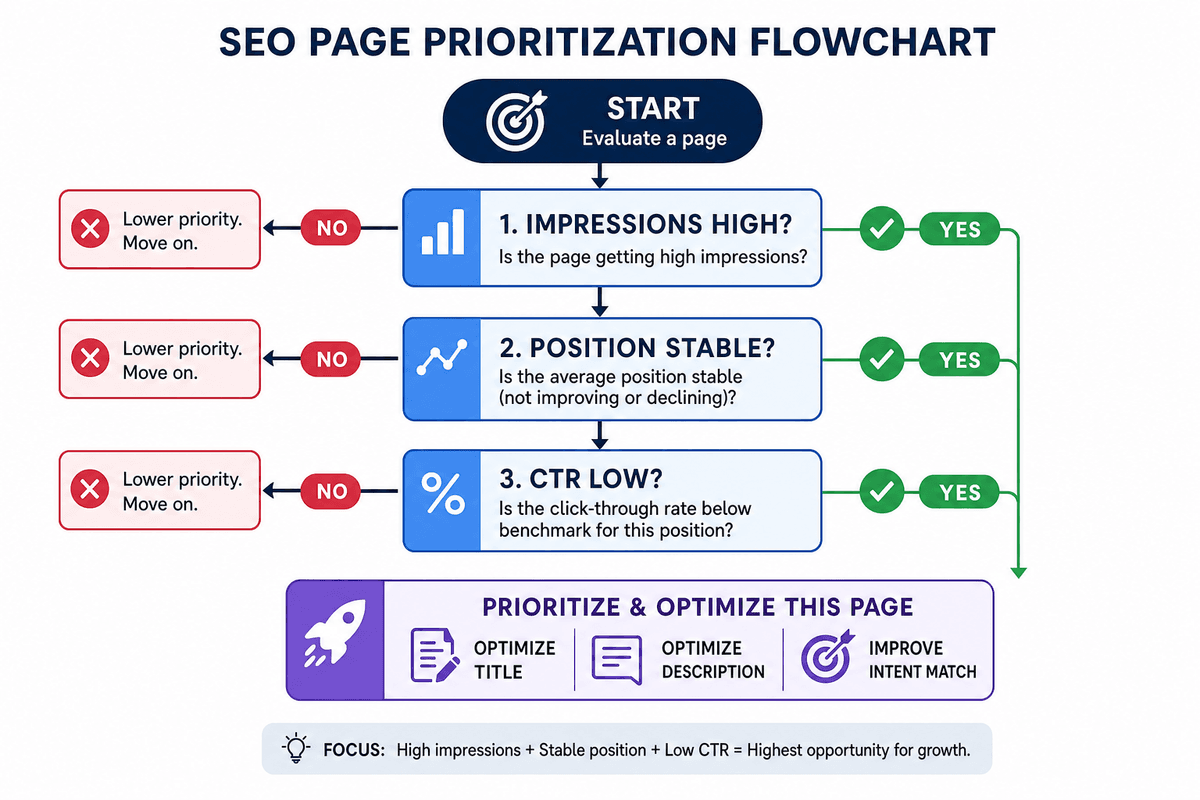
The easiest mistake is rewriting titles at random. Instead, start with a shortlist of pages where better snippets are most likely to matter.
What to look for in Search Console
In Google Search Console’s Performance report, review pages and queries together. You want URLs that have:
Solid impression volume, meaning Google already shows them often
Stable average position, so you are not confusing CTR changes with ranking swings
Below-par CTR for their position, especially on page one or just outside it
Google also notes that performance data can be filtered by pages, queries, devices, and search appearance. Use that. A page may look fine overall but underperform badly on mobile or for one high-value query cluster. The filtering options are documented in the Search Console Performance report.
How to prioritize
A simple monthly workflow looks like this:
Export the last 28 to 90 days of Search Console data.
Sort pages by impressions.
Filter out pages with very low visibility, since small numbers are noisy.
Focus on URLs with average positions where a better snippet can realistically help, usually page one and the top of page two.
Check whether the low CTR is sitewide or tied to specific queries or devices.
Use whichever reporting setup gives you a reliable view of impressions, clicks, CTR, average position, and traffic trends together. The key is to confirm that rankings are relatively stable before you attribute a traffic lift to snippet changes.
Rewrite title tags to earn the click
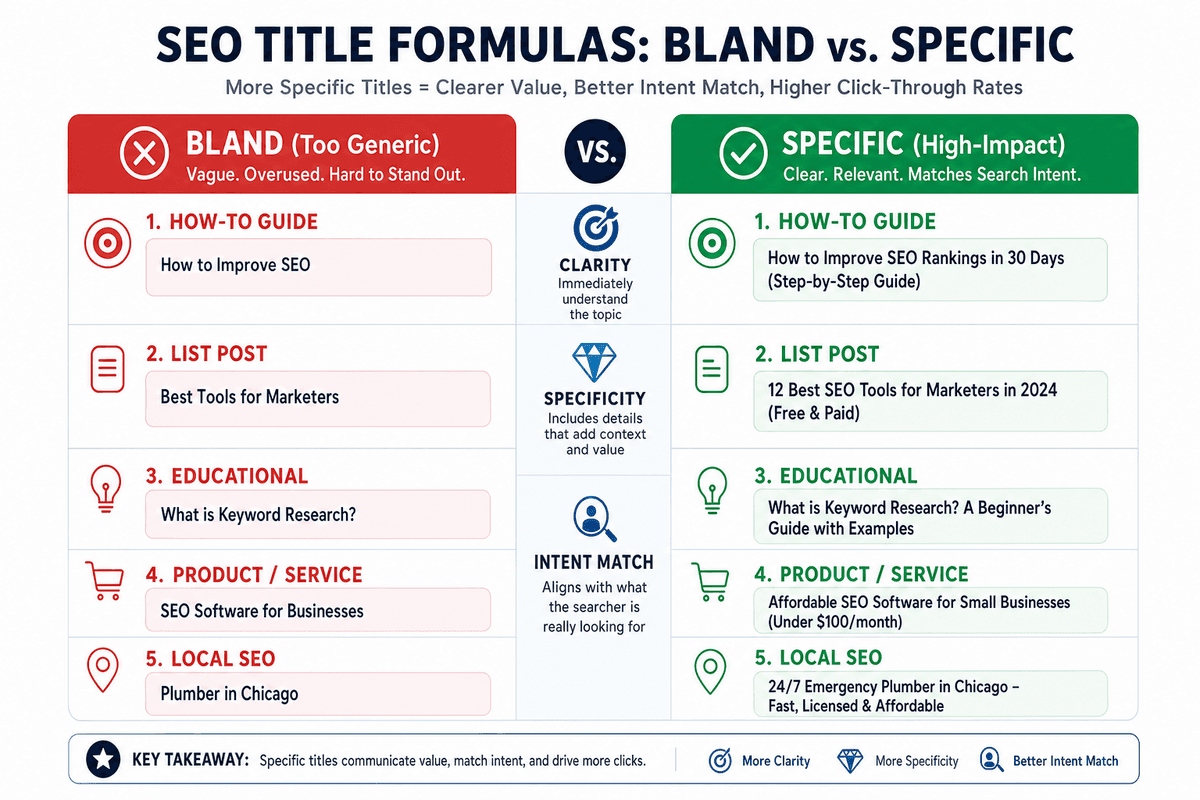
Google says title links are often the primary piece of information people use to decide which result to click. That makes title rewrites one of the highest-leverage CTR tactics for many pages. See Google’s guidance on title links in search results.
What Google wants from titles
According to Google’s title link guidance, good titles are:
Descriptive and concise
Unique to the page
Free of keyword stuffing
Not overloaded with repeated boilerplate
Google may also rewrite titles when the <title> tag is inaccurate, outdated, vague, or mismatched with the visible page heading. So a CTR fix is not only about writing a better title. It is also about making the title, H1, and page content clearly agree. Google explains this in its documentation on influencing title links.
What improves clicks in practice
The strongest rewrites usually improve one or more of these:
Clarity: The reader instantly understands what the page is about.
Specificity: The title signals scope, format, audience, or outcome.
Intent match: The wording reflects what the searcher actually wants.
Freshness: If the query expects current information, the title makes that obvious.
For example, a vague title like SEO CTR Tips is less compelling than How to Improve Organic CTR Without Ranking Higher. The second one makes a sharper promise and matches a clear problem.
Simple title rewrite patterns
These patterns are practitioner heuristics, not hard rules, and they tend to work best when they fit the page honestly:
Outcome-led: “How to Reduce Cart Abandonment on Product Pages”
Format-led: “Organic CTR Checklist for High-Impression Pages”
Freshness-led: “Best Email Automation Tools for 2026”
Audience-led: “SEO Reporting Template for Agencies”
Specificity-led: “7 Meta Description Fixes That Increase Clicks”
Use these carefully. Numbers and years can help, but only when they reflect the actual page. A weak article does not become stronger because you added brackets or a current year.
If you are rewriting titles at scale, drafting tools can help generate variations, but the strategic judgment still matters: the best title is the one that accurately reflects the page and wins the right click.
Improve meta descriptions without treating them like ad copy
Meta descriptions still matter, but not in the simplistic way many SEO checklists imply. Google says snippets are primarily created from page content, though it may use your meta description when that description better summarizes the page for the query. See Google’s documentation on how snippets are created.
In other words, you do not fully control the snippet. Google may show different snippets for different queries even after you update the meta description, so it is worth checking the live SERP and measuring what actually appears for your important searches. But you can improve your odds.
What a good meta description does
A strong meta description helps a searcher answer one question: Is this result worth my click?
That usually means doing three things:
Summarize the page accurately
Surface useful specifics
Reinforce intent match
Useful specifics vary by page type. For articles, that might be the angle, depth, or audience. For product pages, it could be price or category details. For category and service pages, it might be location, use case, or differentiators.
What to avoid
Google explicitly warns against duplicated, low-quality, or keyword-list descriptions. Avoid:
Using the same description across dozens of pages
Writing vague filler such as “Learn more about our services today”
Stuffing keywords without adding meaning
Promising content the page does not deliver
A better way to write them
Think of the meta description as a clear preview, not a slogan. For example:
Weak: “Improve your SEO with expert tips and tricks.”
Better: “Learn how to improve organic CTR with title rewrites, stronger meta descriptions, schema cues, and intent matching for underperforming pages.”
If you publish content regularly, build snippet review into your workflow rather than fixing descriptions one by one forever. Any planning system can help maintain cadence, but CTR gains still come from making each page’s title and description specific to its real search intent.
Match the snippet to search intent
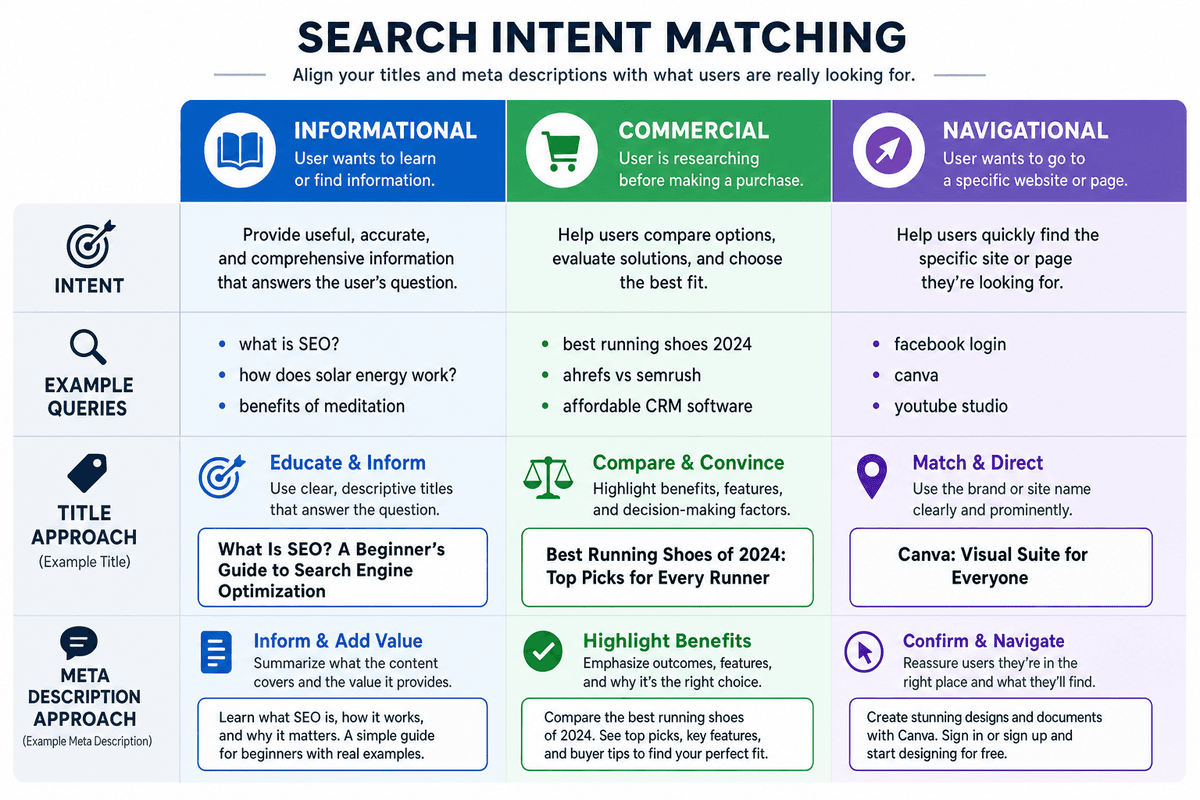
Many low-CTR pages do not have a copy problem. They have an intent problem.
If your result looks like a poor fit for the reason behind the search, people will skip it even when you rank reasonably well.
Informational intent
Informational queries usually reward clarity, usefulness, and completeness. Searchers want confidence that the page will answer the question clearly.
For these pages, titles and descriptions often perform better when they emphasize:
Step-by-step help
Definitions or explanations
Templates, examples, or checklists
Fresh or practical guidance
For instance, “How to Improve Organic CTR Without Ranking Higher” works because it frames a practical solution, not just a broad topic.
Commercial intent
Commercial queries are more comparative. Searchers may be evaluating options, pricing, features, or tradeoffs.
Here, snippet copy often benefits from cues like:
Comparison language
Use-case specificity
Buyer-relevant proof points
Current-year freshness when appropriate
A title such as “Best CRM for Small Agencies” is usually stronger than “Top CRM Tools” because it narrows the fit.
Navigational intent
Navigational searches need certainty more than persuasion. The searcher often wants a particular brand, product, or destination. In those cases, clarity, brand recognition, and exact-match relevance matter most.
Make the SERP promise match the page
If the title promises a checklist, the page should clearly deliver a checklist. If the description implies a comparison, the page should visibly compare options. This is where briefing matters. If your team creates content from outlines or briefs, aligning SERP promise with page structure is much easier when that expectation is captured upfront. That is one reason a process like a usable SEO content brief can improve not just rankings, but also CTR.
Use SERP features and schema cues to stand out
Sometimes a page loses clicks not because the wording is bad, but because competing results take up more visual space or show richer context.
What schema can and cannot do
Structured data does not guarantee a rich result. But it can help Google understand page details and, when the page is eligible, support enhanced search appearances.
The key is to use schema that is accurate for the page. Do not add markup just because a plugin makes it easy. Use it where it genuinely describes the content.
Depending on the page type, that may include cues like:
Breadcrumb information
Product details
Review information
Organization details
What not to overpromise
Structured data is best understood as an eligibility cue for certain enhanced results, not a dependable way to force higher CTR. It may help a result stand out when Google chooses to show eligible rich elements, but it does not guarantee them.
The same caution applies to sitelinks. Site owners do not directly control whether Google shows sitelinks for a result, so clear navigation, headings, and internal structure should be treated mainly as usability and clarity improvements rather than a predictable CTR lever.
Beyond schema: structure still matters
Clear structure still helps. Strong headings, useful section organization, and logical internal linking make pages easier for people to scan and easier for search engines to understand. That does not mean every page will earn a richer snippet, but it does improve the page’s overall clarity and can support better search presentation over time.
Test changes like a scientist, not a gambler
CTR optimization works best when you can tell what actually changed the result.
Change one main variable at a time
If you rewrite the title, meta description, H1, intro, and schema all at once, and CTR improves, you may never know why. That is not always avoidable, but as a rule, make focused changes when possible.
Use enough data to reduce noise
Search Console data fluctuates. Device mix changes. Query mix changes. SERP layouts change. Google also notes that recent data can be preliminary.
So before declaring victory, make sure the page has enough impressions to support a meaningful read. Tiny pages can produce misleading swings.
Track by page, query, and device
A rewrite that helps on desktop may not help on mobile. A title that improves clicks for one query cluster may hurt another. Review changes at multiple levels before rolling a pattern out widely.
This is where combining rank and traffic monitoring is useful. If a page’s position stays flat in your rank tracker while clicks rise in analytics or Search Console, you have much more confidence that the snippet changes did the work.
A simple monthly workflow for improving organic CTR
If you want this to become a repeatable habit, use a lightweight monthly process:
Pull performance data. Review impressions, clicks, CTR, and average position by page and query.
Build a shortlist. Focus on high-impression pages with lower-than-expected CTR at relatively stable positions.
Review the live SERP. Look at what your snippet competes against. Are others clearer, fresher, or more specific?
Rewrite titles first. Improve clarity, intent match, and specificity.
Update meta descriptions. Add a sharper summary and useful context.
Check page alignment. Make sure the visible heading and intro support the promise in the SERP.
Review applicable schema and structure. Add or correct valid cues where they fit.
Measure the outcome. Compare before and after once enough impressions accumulate.
Document what worked. Turn winners into reusable title and snippet patterns.
Tooling note: You can run this workflow with Search Console, spreadsheets, and any rank or analytics stack. If you use ProjectHQ, keep it to the operational layer: monitoring rankings, reviewing analytics, planning updates, and drafting snippet variations in one place. The CTR decisions above should still come from search intent, SERP evidence, and measured performance.
Common mistakes that lower CTR
Being clever instead of clear
Searchers usually reward clarity. If a title hides the topic behind wordplay, curiosity alone may not be enough to win the click.
Reusing the same formula everywhere
Google explicitly warns against repetitive boilerplate in titles and descriptions. Distinct pages need distinct SERP language.
Overpromising
A clickbait title may increase clicks temporarily, but if the page does not satisfy the promise, you are attracting the wrong traffic.
Ignoring context
Average CTR without position, device, or query context can send you in the wrong direction. Diagnose first, then rewrite.
Final takeaway
If you are wondering how to improve organic CTR, start with the pages that already have visibility. You do not need to wait for a ranking jump to win more traffic. In many cases, some of the faster gains come from sharper titles, more useful descriptions, better intent matching, and richer SERP context on already-visible pages.
The opportunity is usually already sitting in your Search Console data: pages that are seen often, clicked too little, and close enough to the action that a better snippet can make a difference. Fix those first, measure carefully, and let the winning patterns shape the rest of your SEO workflow.
Grzegorz is the founder of ProjectHQ and has spent 15+ years in SEO — from technical audits to content strategy that ranks. He builds the product he writes about, so the playbooks here come from running real campaigns, not theory.
Ready to grow traffic?
Write SEO-optimized articles and track your rankings with ProjectHQ.
Get started