Best AI Live Chat for Small Business Websites: Features That Actually Matter
 Grzegorz Graczyk14 min read
If you are looking for the best AI live chat for small business website needs, the biggest mistake is shopping by buzzwords. Most tools promise automation, better support, and more conversions. Fewer explain what actually makes those outcomes possible.
For most small businesses, especially service businesses and SaaS teams, the right AI live chat tool is not the one with the longest feature list. It is the one that can answer questions accurately from your real content, capture leads without adding friction, hand conversations to a human without losing context, and give you a clear view of whether chat is improving conversions.
That is the lens this guide uses. Instead of a bloated roundup, this is a practical buyer's guide to the features that matter most and the types of tools that fit different teams.
Why most AI live chat comparisons miss the point
A lot of comparison content mixes together three different categories:
Traditional live chat tools built mainly for human agents
AI chatbot platforms focused on automated answers
Full support suites that bundle chat into a much larger help desk product
Those categories overlap, but they are not the same purchase.
Zapier's review of live chat apps emphasizes practical criteria like affordability, ease of setup, management features, support options, and integrations. Its roundup is primarily about live chat apps rather than AI-specific buyers' guides, but that framing is still useful for small businesses evaluating website chat. In editorial terms, the AI layer tends to work best when there is enough context behind it, such as a detailed knowledge base and repeatable question patterns. For many small teams, the goal is not an enterprise support stack. It is a faster way to answer pre-sales and support questions on the website without missing opportunities.
Comm100's comparison article positions some live chat platforms around enterprise needs such as security, routing depth, and broader support operations. That is one vendor's market framing, not a neutral industry taxonomy, but it does highlight a useful distinction between tools built for larger support environments and tools aimed at simpler website chat use cases. If you run a local service business, agency, consultancy, or growing SaaS product, that distinction can matter. In many small-business cases, buying a heavyweight support suite when you mainly need website conversion help may add cost and complexity without solving the real problem.
In other words, the best AI live chat tool is not the one with the most features. It is the one that fits your website, your sales process, and your team's ability to maintain it.
The four features that actually matter
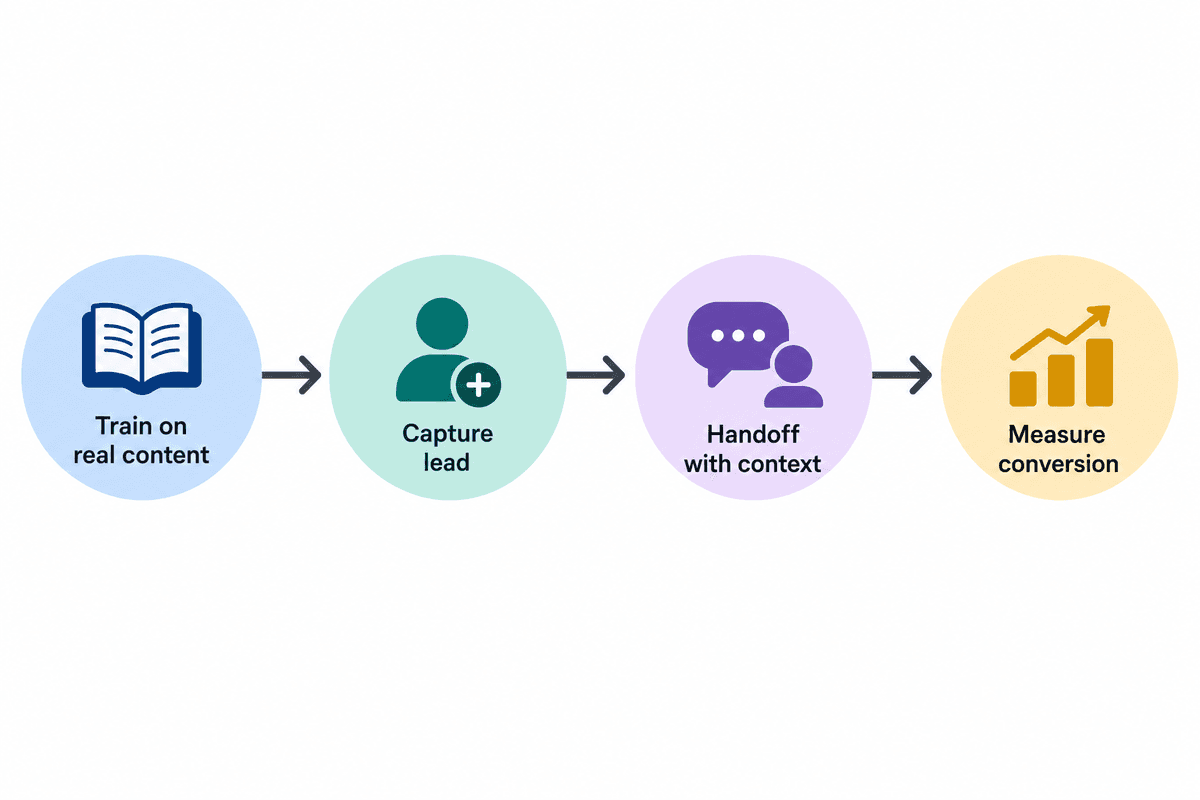
If you only compare four things, compare these.
Training from real site content
This is the foundation. If an AI assistant cannot learn from your website, docs, policies, and FAQs, it will either answer too generically or fall back on incomplete information.
That is why knowledge grounding matters more than flashy prompts. On ProjectHQ's Live Chat & AI Assistant page, the product is described as answering visitor questions from the knowledge base rather than guessing from generic model knowledge. On the Knowledge Base page, ProjectHQ also states that AI sources can include crawled URLs, text, PDFs, and pages synced from site audits. ChatBot.com similarly says teams can train a bot on a website, help center, and product docs. Across tools, the underlying buying criterion is the same: you want answers grounded in sources you can actually maintain.
That does not make any one vendor unique. It means training from maintained business content should be a non-negotiable buying criterion, whether you are looking at ProjectHQ, ChatBot.com, or another tool that documents how its assistant learns from your website and help content.
Lead capture inside the conversation
Many website chat conversations start before the visitor is ready to fill out a form. They have a pricing question, a setup concern, or a quick objection. If your chat tool only answers questions but does not capture who that person is, you may improve responsiveness while still losing the lead.
ProjectHQ explicitly says its AI chat can collect a visitor email before escalating to a human. That is a useful pattern because it turns support-like conversations into recoverable pipeline opportunities. When the chat is connected to a CRM, that matters even more. On its CRM & Contacts page, ProjectHQ says contacts store page views, chat conversations, form submissions, and source data in one profile.
For small businesses, that is often more valuable than a long list of support-center features. A missed sales question on a pricing page can be more expensive than a delayed answer to a low-priority support request.
Human handoff with context
Bad handoff is one of the fastest ways to make AI chat feel cheap. Visitors get frustrated when a bot asks several questions, then a human joins and makes them start over.
Look for tools that preserve context, conversation history, and page-level intent. ProjectHQ says human agents can take over anytime from a unified inbox and that conversation history is attached to contact profiles. ChatBot.com also markets human handover as part of its AI setup, while Zapier's evaluation treats transcripts, transfers, and continuity as important parts of a strong live chat experience. Those examples come from a mix of vendor documentation and independent editorial review, but together they point to the same practical standard: a visitor should not have to restart the conversation when a person steps in.
In practice, clean handoff matters more than full automation. The bot should handle routine questions and collect enough context that a human can enter the conversation informed, not blind.
Conversion measurement
If you cannot measure outcomes, you cannot tell whether the tool is helping. Chat volume alone is not proof of success.
What matters more is whether chat-assisted visitors become contacts, qualified leads, meetings, trials, or customers. ProjectHQ's Lead Board and Website Analytics pages point to this broader workflow: chat creates or updates contacts, leads move through stages, and analytics help show where visitors came from and what they did on-site.
That is the standard to use when comparing tools. Ask not just, "Can it chat?" Ask, "Can I see whether chat improves pipeline movement or conversion behavior?"
How to evaluate AI live chat tools without getting distracted by demos
Demos are usually polished. Your website is not. That is why you need a simple evaluation process built around your own use cases.
Use real questions from your site
Build a short test script with the questions visitors already ask:
How much does this cost?
Do you work with companies like ours?
How long does setup take?
Can I talk to a person?
What happens after I sign up?
For SaaS teams, add onboarding and product questions. For service businesses, add qualification and process questions.
Check how the AI is trained
Ask exactly what content the system uses and how updates are handled. Can it read your website? Does it use a help center or knowledge base? Can you add PDFs or plain text? Does it stay synced when content changes?
Those are not minor implementation details. They largely determine whether the tool answers accurately a month after launch, not just on day one.
Test uncertainty and escalation
Do not just test questions the bot should answer. Test questions it should not answer confidently. Then see what happens.
A strong system should do one of three things:
Ask a clarifying question
Route the visitor to a relevant answer
Escalate cleanly to a human
If the bot bluffs, handoff quality will not save you.
Review pricing and operational drag
Zapier notes that affordability and ease of setup are central evaluation criteria for live chat tools. That is especially true for small teams. Pricing and packaging vary widely: some tools charge by user, some by conversation volume, and some layer AI limits or add-ons on top. Others are simple to launch but harder to maintain once workflows, routing, and integrations grow.
The best choice is often the tool your team can actually keep accurate and useful.
What we evaluated and what to ask for in a real trial
This guide is based on a review of published product pages and independent roundup coverage included in the sources above, not a controlled lab benchmark across every tool mentioned. Because of that, the most reliable way to validate fit is to run the same short trial across your shortlist and compare the results side by side.
Sample questions worth testing
Pricing: How much does this cost, and what is included?
Fit: Do you work with companies like ours?
Process: How long does setup take?
Escalation: Can I talk to a person?
Post-signup: What happens after I sign up?
Uncertainty test: ask a question that is missing from your docs and see whether the bot guesses, clarifies, or escalates.
What good and bad handoff look like
A good handoff preserves the transcript, captures contact details when appropriate, and gives the human enough context to continue without repeating the intake. A bad handoff forces the visitor to restate their question or drops the conversation into a separate inbox with no page or history context.
What proof to ask vendors for
If you are comparing multiple tools, ask each vendor for the same artifacts: a screenshot of the training inputs, an example transcript showing escalation to a human, and a reporting view that shows whether chat-created conversations become contacts or leads. Those proof points are usually more decision-useful than a polished homepage demo.
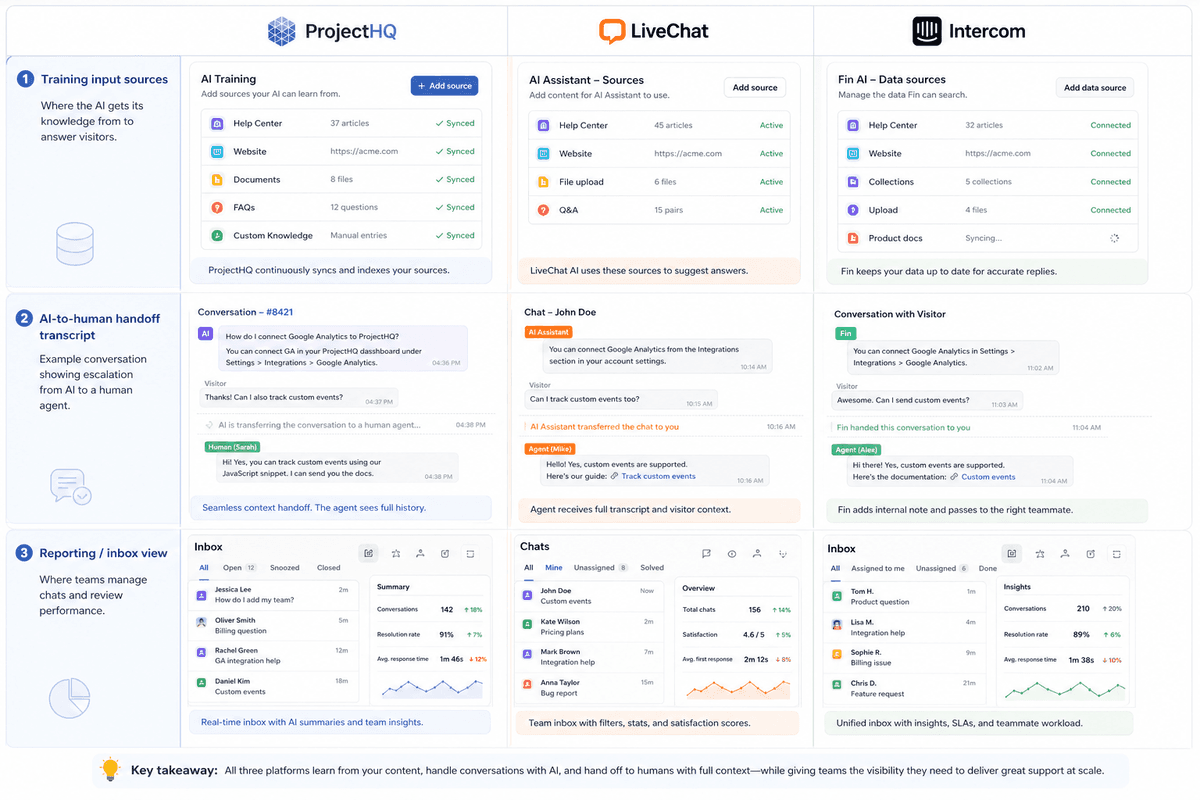
A realistic comparison of the main options for small teams
Rather than pretending there is one universal winner, it is more honest to compare the main tool types and where they fit.
Tool type | Best for | Strengths | Watch-outs |
|---|---|---|---|
Agent-first live chat | Teams that mainly want human chat on the website | Fast setup, solid support workflows, familiar agent tools | AI may be limited or sold separately; lead tracking can be fragmented |
AI chatbot platform | Teams prioritizing automated answers from site content | Training from docs and website content, routine question handling, always-on responses | Can feel disconnected from CRM or website analytics if used as a standalone tool |
Full support suite | Larger or more regulated teams with broad service operations | Deep routing, compliance, omnichannel coverage, advanced support operations | Often more complexity and cost than a small business website needs |
All-in-one website platform with chat | Lean teams that want chat tied to content, contacts, and conversion workflows | Fewer disconnected tools, cleaner reporting, easier connection between chat and lead outcomes | May be less ideal if you need enterprise help desk depth above all else |
Agent-first live chat tools
Tools in the LiveChat or tawk.to mold are still good options when the core need is human conversation. Zapier recommends both in its roundup, with tawk.to highlighted as a free option and LiveChat praised for strong overall functionality. If your website gets modest volume and your differentiator is quick personal response, that can be enough.
The trade-off is that AI, knowledge grounding, and conversion reporting may require extra add-ons or more stitching together across your stack.
AI chatbot platforms
ChatBot.com represents the more AI-forward approach. Its positioning centers on training from a website and docs, automated answers, multichannel coverage, and human handover. That is attractive if your biggest problem is repetitive questions and after-hours responsiveness.
The risk is not the AI itself. It is what happens if the tool sits outside the rest of your workflow. If a conversation ends without a clear contact record, follow-up path, or conversion view, you may solve one problem while creating another.
Full support suites
Platforms like Zendesk and Comm100 can be strong choices for organizations with larger support demands, more channels, or stricter operating requirements. In the source reviewed for this article, Comm100 in particular emphasizes security, deployment flexibility, compliance, and advanced routing. That is vendor-provided positioning rather than an independent benchmark, but it does help explain why some buyers place these tools in a more enterprise-oriented bucket.
That may be appropriate for some companies. For a typical small business website, though, it can be more system than you need. If your chat mainly needs to answer sales and onboarding questions, qualify interest, and route edge cases to a person, the extra breadth of an enterprise support suite may not justify the added complexity or cost. That is an editorial judgment based on the use case, not a sourced universal rule.
All-in-one systems
This is the strongest model when you want live chat to affect conversion, not just support. In an all-in-one setup, chat does not live alone. It connects directly to your knowledge base, contact records, lead stages, and site analytics.
That tighter connection is what makes it easier to answer the question every owner eventually asks: is this thing actually helping us win business?
Where ProjectHQ fits for small business websites
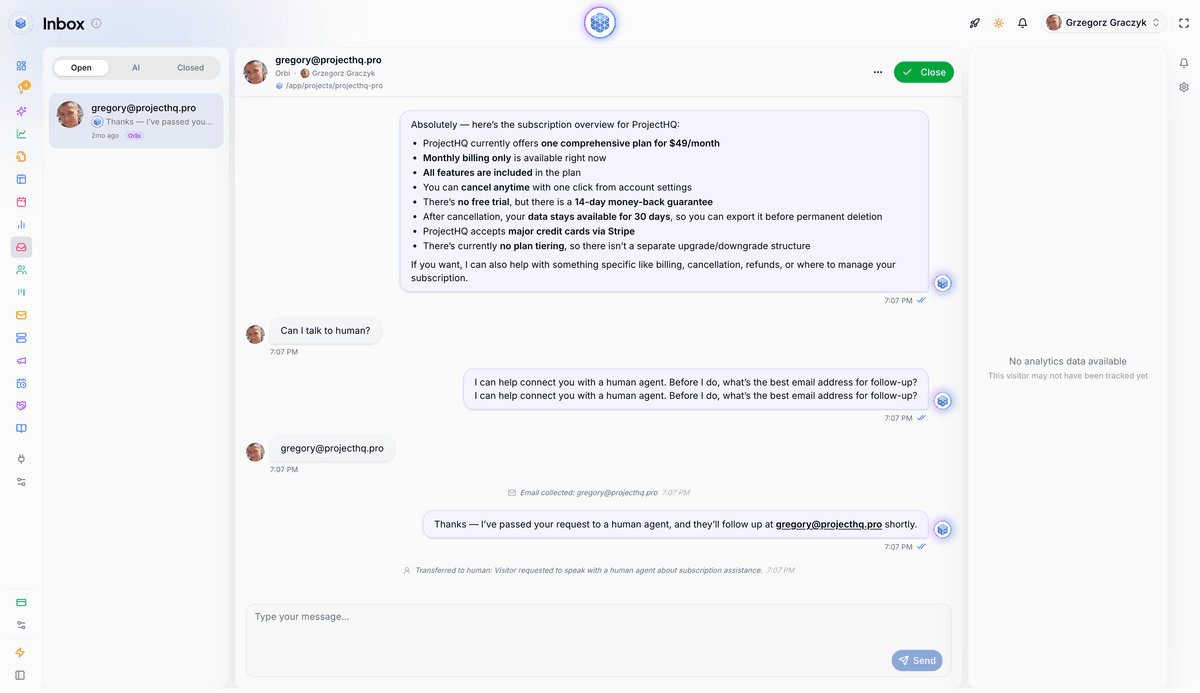
ProjectHQ is a natural fit for this topic because it is not just a chat widget. Based on its product pages, it connects AI live chat to the rest of the website growth workflow.
What ProjectHQ clearly does
According to ProjectHQ's Live Chat & AI Assistant page, the platform offers:
An embeddable chat widget
AI answers powered by the knowledge base
Page-aware responses based on what the visitor is viewing
Email capture before human escalation
Human takeover from a unified inbox
Conversation history attached to contact profiles
Its Knowledge Base page adds that the same source of truth can be built from crawled URLs, documents, text, and synced site content. Its CRM, Lead Board, and Analytics pages show the adjacent pieces: contact records, pipeline stages, and visitor behavior tracking.
That combination matters because small businesses often do not struggle with chat alone. They struggle with disconnected tools.
Where it fits best
Based on its published feature set, ProjectHQ appears especially suited to teams that want website chat to support lead generation and self-service together:
Service businesses that need to answer buyer questions quickly, capture contact details, and step in personally when intent is high
SaaS teams that need to handle pricing, onboarding, feature, and implementation questions while connecting those conversations to contacts and funnel stages
Lean teams that do not want a separate live chat tool, separate CRM, separate knowledge layer, and separate analytics dashboard
For SaaS in particular, that conclusion is based on feature alignment more than customer-proof evidence in the sources reviewed here. ProjectHQ's page for founders positions the platform around traffic, visitors, and growth rather than only support operations, which suggests a website-growth use case even though it is not the same as a third-party case study.
Where another tool may fit better
If your main need is a full enterprise support suite with extensive omnichannel service operations, deep compliance requirements, or a large agent organization, another platform may be a better fit. That is not a knock on ProjectHQ. It is simply a different use case.
For small business websites focused on leads and conversion, though, the integrated model is a real advantage.
The setup work that determines whether AI live chat succeeds
Even the right tool will disappoint if the content behind it is weak.
Your knowledge base is the real engine
If your site lacks clear answers about pricing, process, policies, onboarding, timelines, or common objections, AI live chat will expose the gaps quickly. It cannot ground answers in content that does not exist or is out of date.
That is why a knowledge base is not just a support asset. It is a conversion asset too. ProjectHQ's published guide, How to Build a Website Knowledge Base That Reduces Support Tickets, makes this point well: visitors often do not separate support questions from buying questions. The same content that reduces repetitive tickets can also remove friction for prospects evaluating your business.
Start with the highest-friction questions
Before launching AI chat, list the questions your team answers repeatedly in:
Sales calls
Email threads
Live chat logs
Support tickets
Onboarding conversations
Then publish or improve those answers first. For many small teams, that includes topics like pricing details, implementation expectations, turnaround times, integrations, billing, and common troubleshooting steps.
Keep the system maintainable
The goal is not to create a giant documentation project before you ever launch chat. The goal is to make sure your most commercially important answers are documented clearly and kept current.
That is where a connected knowledge layer can help. When the chat tool relies on the same source of truth as the rest of the platform, it is easier to keep answers consistent over time.
How to choose the best AI live chat for your business type
For some teams, that will mean a simpler human-first tool. For others, it will mean an AI chatbot platform. And for teams that want chat connected to a knowledge base, CRM, lead tracking, and analytics, ProjectHQ appears to be a credible fit based on its published features, while tools like ChatBot.com, LiveChat, tawk.to, or more enterprise-oriented platforms may fit better depending on whether your priority is automation depth, low-cost human chat, or broader support operations.
If you run an agency, consultancy, clinic, legal practice, home service company, or other service business, your chat tool should help with three things:
Qualifying whether the visitor is a fit
Answering trust and process questions quickly
Escalating to a real person when purchase intent is high
In this context, lead capture and handoff matter more than intricate support workflows. You want a system that can answer routine questions, collect contact information, and keep enough context that someone on your team can continue the conversation intelligently.
For SaaS teams
SaaS teams often need a wider mix of pre-sales and post-signup support. Chat needs to handle product education, implementation questions, plan comparisons, and onboarding friction. It also helps when those conversations connect to a contact record and visible funnel stage.
That is one reason integrated setups can work well for software companies. Instead of treating chat as a separate support widget, it becomes part of the path from visitor to trial, qualified lead, or customer.
For teams with very small budgets
If budget is the main constraint, a lower-cost or free agent-first tool may still be the right starting point. Just be honest about the trade-off: you may gain live chat availability without yet gaining strong AI grounding, conversion visibility, or streamlined follow-up.
That is a valid first step. It just is not the same thing as a fully connected AI live chat workflow.
Bottom line
The best AI live chat for small business website use is not the one with the loudest AI pitch. It is the one that does four things well: answers from your real content, captures leads inside the conversation, hands off to humans cleanly, and helps you measure whether chat affects conversions.
For some teams, that will mean a simpler human-first tool. For others, it will mean an AI chatbot platform. And for service businesses and SaaS teams that want chat connected to a knowledge base, CRM, lead tracking, and analytics, ProjectHQ has a credible and natural fit based on its published features.
Whatever tool you shortlist, run a real test with your own pages and your own questions before you commit. That will tell you more than any demo ever will.
Grzegorz is the founder of ProjectHQ and has spent 15+ years in SEO — from technical audits to content strategy that ranks. He builds the product he writes about, so the playbooks here come from running real campaigns, not theory.
Ready to grow traffic?
Write SEO-optimized articles and track your rankings with ProjectHQ.
Get started