Search performance shows what's growing, and where you can grow
See which searches and pages are growing or slipping, split brand from non-brand searches, and find the searches worth pushing to the top.

We rebuilt Search performance to read the way Analytics does.
It opens on Clicks, Impressions, CTR and Avg. position over one chart, with the window before drawn as a dashed line beside it. Below that, Searches, Pages, Countries and Devices are ranked lists, each with All, Growing and Declining, so you see at a glance what's picking up and what's slipping.
Click any row and the whole page filters to it. Pick a search to see which pages it brings people to, or a page to see the searches behind it. The expand icon on each card opens the full table.
At the top, All, Non-brand and Brand split every figure. Brand searches come from people who already know your name. Non-brand searches come from people who found you by what you do, and they're usually the ones worth growing.

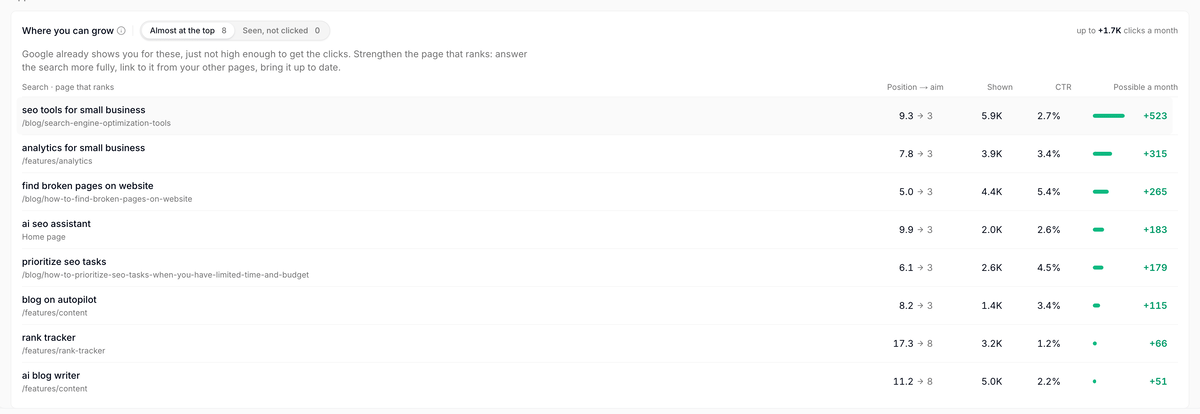
Where you can grow lists the searches worth a push. Almost at the top shows searches where Google already shows you, just not high enough to get the clicks, next to the page that ranks. Seen, not clicked shows page-one searches that few people click. Each one comes with the clicks a month it could bring.